A CSS Grid layout is easier to place when you think in boundaries rather than boxes. Grid lines are the invisible horizontal and vertical lines that form the coordinate system: every row and column lies between two lines, and every grid cell is enclosed by four. A grid with three columns has four vertical lines; a grid with two rows has three horizontal lines. section 4.2 section 4.2.1
Lines use one-based numbering. Starting at the top-left, positive line numbers begin at 1; from the bottom-right, negative numbers begin at −1. To position an item, `grid-column` and `grid-row` name its starting and ending boundaries, not a cell number. Thus `grid-column: 3 / 4` and `grid-row: 2 / 3` place an item in column 3, row 2. section 4.2.1
Figure 4.2 You can enable the display of grid line numbers in your browser’s devtools.
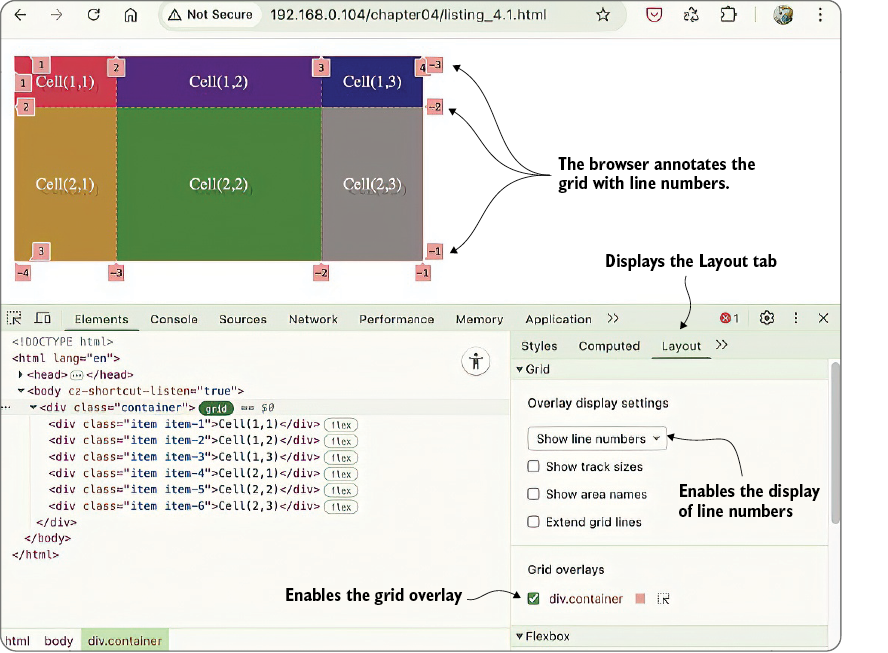
Enable grid line numbers in the browser’s grid overlay to compare CSS coordinates directly with the rendered grid. section 4.2.1
Use line coordinates in three practical ways:
- Span multiple cells by choosing boundaries farther apart: `grid-column: 2 / 4` covers the columns between lines 2 and 4, while `grid-row: 1 / 3` covers both rows. section 4.2.1
- Use `span` when the number of tracks matters more than the endpoint. Starting at line `n` and spanning `m` tracks ends at line `n + m`; `grid-column: 2 / span 3` is equivalent to `2 / 5`. section 4.2.2
- Use `-1` as the final explicit line when the grid width can change. `grid-column: 1 / -1` stretches an item from the first to the last column boundary. section 4.2.3
A full-width title and last-row total
A changing product grid can keep its title across the full width with `grid-column: 1 / -1`. A total row can also occupy the last explicit row with `grid-row: -2 / -1`. This depends on explicit tracks: rows generated by `grid-auto-rows` are implicit and do not receive negative line numbers, so a footer can unexpectedly appear at the top instead of the bottom. section 4.2.3 section 4.5
The practical rule is simple: count boundaries, not columns. For a fixed grid, positive line numbers make positions precise; for layouts whose track count changes, `span` expresses a relative width and negative line numbers anchor placement to an explicit grid’s end. section 4.2.2 section 4.6

