A hierarchical visualization represents nested parent-child relationships so patterns hidden by simpler numerical charts become visible. It communicates hierarchy through enclosure, connections, or adjacency. section 11.0
Common forms encode the same structure in different ways:
- Circle packs and treemaps use enclosure; circles or rectangles contain successive child levels. section 11.0
- Tree charts use connections between nodes, with linear layouts favoring readability and radial layouts saving space. section 11.0
- Icicle charts use adjacency to show hierarchical layers. section 11.0
Build the hierarchy with D3
Start with CSV data containing child and parent columns, or with hierarchical JSON. Convert the data into a root structure using d3.stratify() for CSV or d3.hierarchy() for JSON. Use root.descendants() for every node and root.leaves() for terminal nodes. Pass the root to d3.pack() or d3.tree() to calculate positions and sizes before drawing the circles, links, or nodes. section 11.1 section 11.5
Figure 11.1 In hierarchical visualizations, the parent-child relationship can be communicated via enclosure (e.g., a circle pack or a treemap), connections (e.g., a tree chart), or with adjacency (e.g., an icicle chart).
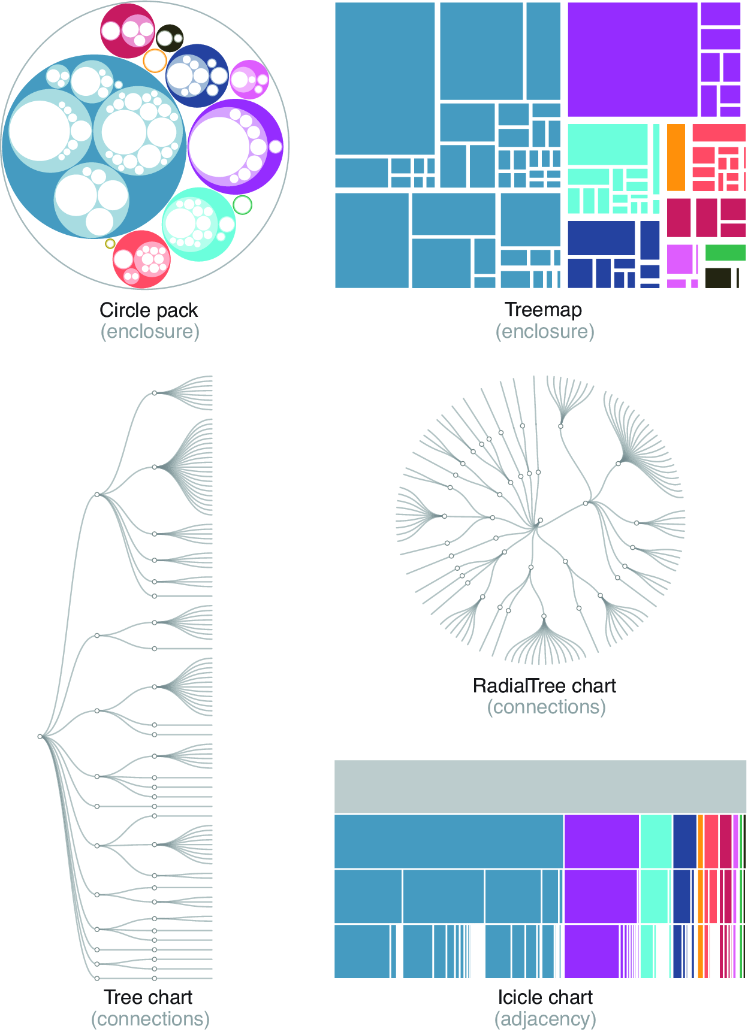
Compare enclosure, connection, and adjacency layouts at a glance. section 11.0
