A home page is a website’s first or main page: the page visitors see when they arrive. Its URL is the site’s domain name, such as example.com. Other pages and posts have their own URLs, often called permalinks, such as example.com/world. A home page may also be called a landing page, front page, index page, splash page, or start page. section 2.2.1
Treat the home page as a quick introduction and a clear invitation to continue. Visitors make fast stay-or-leave decisions, so the opening sentence and first paragraph need to capture attention immediately. The page should then lead readers toward one call to action, rather than competing goals. section 4.3 section 4.4
Plan a focused home page before choosing its visual style:
- Write a short, catchy title that states the site’s purpose, followed by a brief paragraph explaining its benefit. section 4.3.4
- Keep the visible content concise. Put essential information first; divide unavoidable longer material with subheadings or a bulleted list lower on the page. section 4.3.4
- Use images that make the purpose understandable at a glance, not images that merely decorate or background elements that compete for attention. section 4.3.4
- Choose one primary goal and make every prominent element support it. Related but secondary topics belong on interior pages. section 4.3.4
- Give readers a reason to continue beyond the home page, helping avoid an immediate exit without viewing interior pages. section 4.3.4
Creating a recipe-site home page
For a recipe site, a title and opening copy can quickly establish what the visitor will find, while food imagery reinforces that purpose. A modern, minimalist design can be explored by asking Canva through GPT to create an elegant recipe home page, selecting a promising template, trying searches such as “Recipes website landing page,” resizing the layout, and replacing its text. The finished page should still serve the site’s own goal rather than simply copying a template. section 4.3.3 section 4.3.4
Figure 4.7 If you want a less comfy homey design for your site, experiment with Canva. With its well-thought-out UI, you can quickly compose a pleasing, professional-looking image.
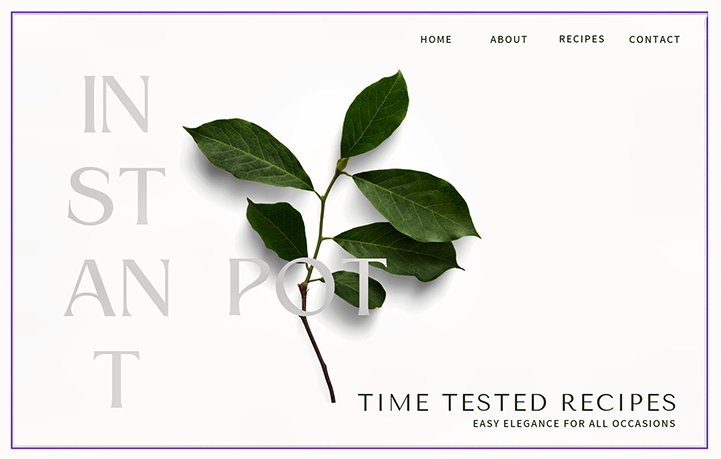
Use the design example to compare a minimalist home-page direction with a warmer or more decorative style, then adapt the layout and wording to your own purpose. section 4.3.3
Refine the page after seeing it as visitors will. Typography, color consistency, readable headings, focused imagery, and familiar navigation labels all affect whether the page is easy to scan. An AI review can compare an uploaded home-page image with successful competing sites and suggest concrete improvements; review those suggestions with your own goals and judgment in mind. section 4.4 section 6.9


