A host route reaches exactly one destination IP address. In IPv4, it uses a /32 prefix; in IPv6, it uses a /128 prefix. A network route covers multiple addresses and therefore uses a shorter prefix. section 9.2.1 section 21.2.1
A local route is a host route created for the router’s own interface address. When a packet matches that route, the router receives and processes the packet instead of forwarding it. Route selection prefers the most specific matching route, making a /32 or /128 route more specific than broader routes. section 9.2.1 section 9.4
Recognize host routes by these characteristics:
- IPv4 host routes appear with a /32 prefix, such as 192.168.1.1/32; an address such as 192.168.1.2 does not match it. section 9.2.1
- IPv6 host routes appear with a /128 prefix, such as 2001:DB8::1/128. section 21.2.1
- A connected route is a network route, while a local route is a host route; these classifications describe the destination prefix, not the next-hop method. section 9.4
- A static host route can also be recursive, directly connected, or fully specified, depending on whether it names a next hop, exit interface, or both. section 21.3.4
IPv6 static host route
The command `ipv6 route 2001:db8:1:1::1/128 GigabitEthernet0/1 fe80::2` creates a host route because /128 identifies one destination address. Because it specifies both an exit interface and next-hop address, it is fully specified. section 21.3.4
Figure 9.5 The IP address of R1’s G0/0 interface and a /32 prefix length written as a netmask in dotted decimal and binary. With a prefix length of /32, the route only includes a single IP address (192.168.1.1, in this case). A packet destined for 192.168.1.2, for example, cannot use this route.
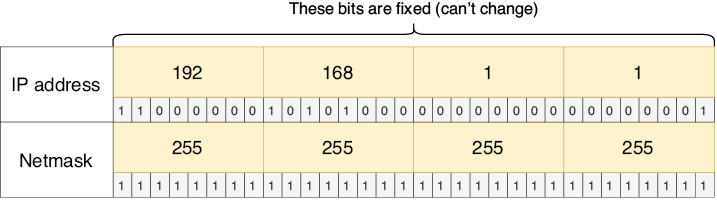
Compare a /32 host route with a /24 network route: /32 fixes every address bit, so only the listed IP address matches. section 9.2.1
R1# show ipv6 route
IPv6 Routing Table - default - 5 entries
Codes: C - Connected, L - Local, S - Static, U - Per-user Static route
. . .
C   2001:DB8::/64 [0/0]                              #1
     via GigabitEthernet0/0, directly connected      #1
L   2001:DB8::1/128 [0/0]                            #2
     via GigabitEthernet0/0, receive                 #2
C   2001:DB8:1::/64 [0/0]                            #3
     via GigabitEthernet0/1, directly connected      #3
L   2001:DB8:1::1/128 [0/0]                          #4
     via GigabitEthernet0/1, receive                 #4
L   FF00::/8 [0/0]                                   #5
     via Null0, receive                              #5
#1 G0/0’s connected route
#2 G0/0’s local route
#3 G0/1’s connected route
#4 G0/1’s local route
#5 A route that discards multicast traffic
Inspect connected and local IPv6 entries together; each interface receives a network route and a /128 local host route. section 21.2.1
