An ASP.NET Core application is a console application that runs a web server, typically Kestrel, inside its own process. Kestrel receives HTTP requests, passes them to the application, and returns responses. Unlike earlier ASP.NET applications, the application does not depend on IIS to call into it. section 27.1 section 2.4.2
There are two common ways to expose the application:
- Expose Kestrel directly to the network. This is supported. section 2.4.2
- Place a reverse proxy in front of it. The proxy receives internet requests and forwards them to the application. Examples include IIS on Windows and NGINX or Apache on Linux. section 27.1
Figure 27.1 The hosting model for ASP.NET Core gives flexibility. The same application can run exposed directly to the network, behind various reverse proxies without modification, and even inside the IIS process.
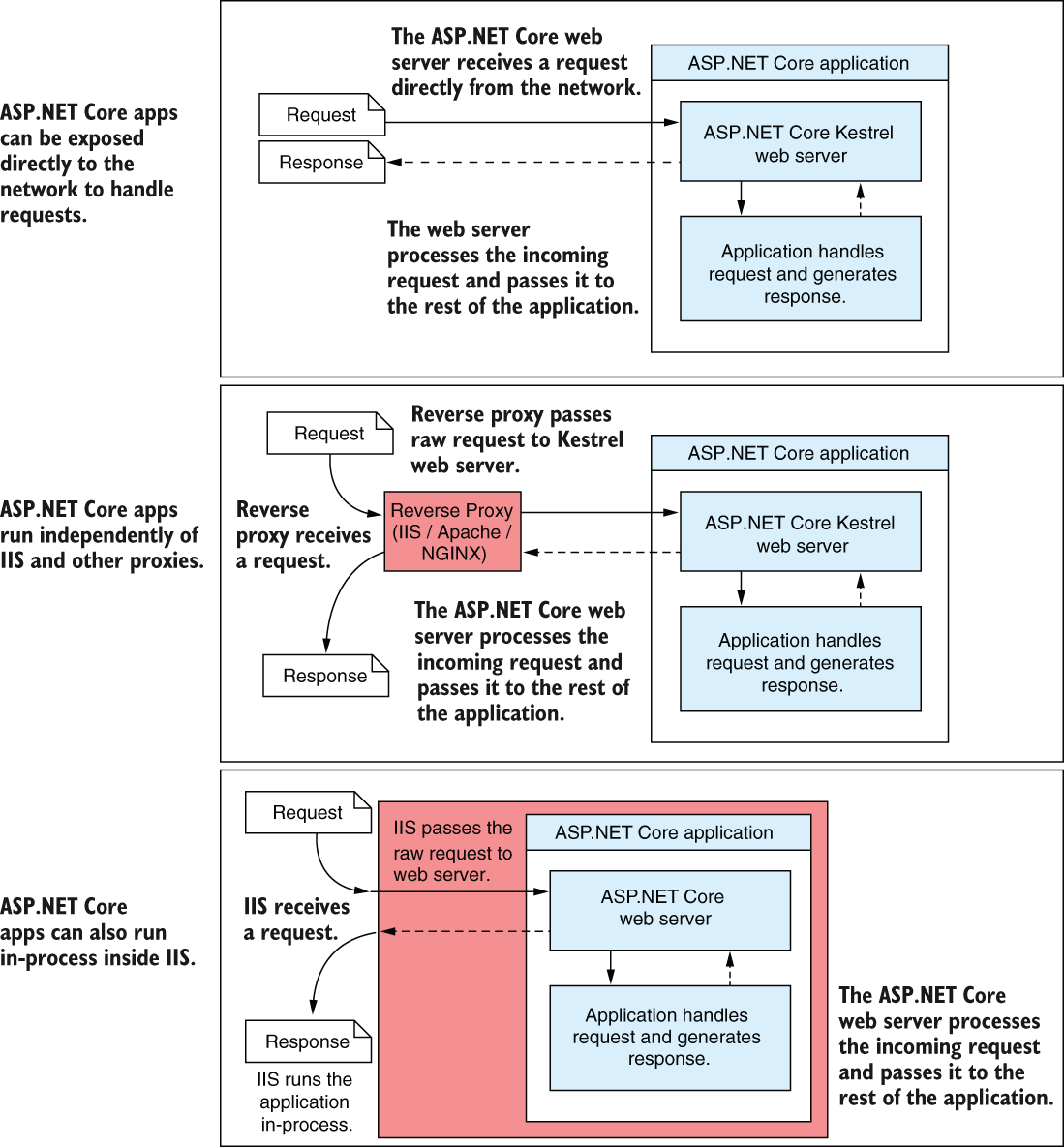
The figure compares direct exposure with hosting behind different reverse proxies. The same application can run in these arrangements without modification. section 27.1
To start an application using the Startup-based model, Main builds and runs an IHost. The host contains Kestrel, services, and configuration. Program sets up the host; Startup configures application services and the middleware pipeline. section 30.2
Listing 30.1 The Program.cs file configures and runs an IHost
public class Program
{
    public static void Main(string[] args)
    {
        CreateHostBuilder(args)                                #1
            .Build()                                           #2
            .Run();                                            #3
    }

    public static IHostBuilder CreateHostBuilder(string[] args) =>
        Host.CreateDefaultBuilder(args)                        #4
            .ConfigureWebHostDefaults(webBuilder =>            #5
            {
                webBuilder.UseStartup<Startup>();              #6
            });
}
Follow the Program.cs listing from CreateDefaultBuilder through Build and Run. UseStartup<Startup>() identifies where this arrangement places service and middleware configuration. section 30.2
