An HSRP group lets routers share a virtual IP address and provide a redundant default gateway. One router becomes active, while another remains standby and takes over if the active router fails. section 19.2.1 section 19.3
Key operational points:
- Match the group number and virtual IP address on participating routers; mismatches prevent cooperation. section 19.3
- Elect the router with the highest priority; if priorities tie, use the router with the highest IP address. section 19.3
- Use preemption when the preferred router should reclaim the active role after recovering. section 19.3
- Configure one HSRP group per subnet; distribute active roles across routers to balance traffic. section 19.2.1
Two-router HSRPv2 group
On R1, configure `standby version 2`, `standby 1 ip 10.0.0.1`, `standby 1 priority 105`, and `standby 1 preempt`. On R2, configure HSRPv2 and the same virtual IP with the default priority. R1 becomes active, R2 becomes standby, and `show standby brief` verifies the roles. section 19.3
Figure 19.5 HSRP load balancing. R1 is the active router in subnet 1 and the standby router in subnet 2. R2 is the standby router in subnet 1 and the active router in subnet 2.
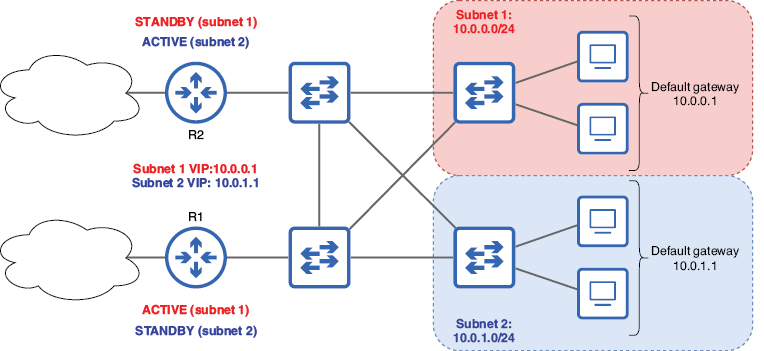
Visualizes how R1 and R2 exchange active and standby roles across two subnets for HSRP load balancing. section 19.2.1
