HTMLElement is the browser-provided DOM base class for custom HTML elements. Extend it with a JavaScript class, then register that class under a custom element name. section 1.3 section 3.1
A minimal HTMLElement-based component follows these rules:
- Extend HTMLElement or a subclass of it. section 3.1.1
- Register the class with customElements.define and a lowercase name containing at least one hyphen. section 3.1 section 3.1.1
- Use an explicit closing tag because custom elements cannot be self-closing. section 3.1
- Avoid duplicate registrations by checking customElements.get before defining a name. section 3.1.1
A greeting component
class HelloWorld extends HTMLElement { connectedCallback() { const name = this.getAttribute("name") ?? "World"; this.innerHTML = `<p>Hello, ${name}!</p>`; } } customElements.define("hello-world", HelloWorld); Use it as <hello-world></hello-world> or <hello-world name="Mark"></hello-world>. A component can also attach a shadow root, place HTML and CSS inside it, and respond to events such as clicks. section 1.3 section 3.1.1
Figure 1.2 illustrates how a web component encapsulates HTML, CSS, and JavaScript within a single JavaScript class that extends HTMLElement. The class defines the component’s lifecycle and behavior, specifies its HTML markup, and applies CSS to control its appearance in a way that’s scoped to the component.
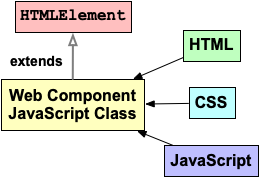
Shows how one HTMLElement subclass combines component lifecycle, HTML markup, JavaScript behavior, and scoped CSS. section 1.3


