A web server receives HTTP requests and returns HTTP responses containing web resources. In a browser-based exchange, a URL identifies a host and path, the client sends a request, and the server returns a response that the browser can display. section 1.4.1 section 1.6
An HTTP server handles the exchange in several stages:
- Receives a request containing a verb, path, headers, and sometimes a body. section 1.4.1
- Interprets the request and generates an appropriate response, such as HTML, an access-denied message, or another result. section 1.4.2
- Returns a response containing a status code and optionally headers and a body. section 1.4.1
ASP.NET Core applications include Kestrel by default, a built-in, fast, cross-platform web server. Kestrel receives raw network requests, constructs an HttpContext, passes it to the application, and converts the resulting representation into a raw HTTP response. section 1.4.2 section 2.4.2
Direct hosting and reverse proxies
An ASP.NET Core application can expose Kestrel directly to the internet. More commonly, IIS, NGINX, HAProxy, Apache, or YARP receives internet traffic and forwards requests to the underlying web server, providing a separation associated with security and performance benefits. section 2.4.2
Figure 1.3 How an ASP.NET Core application processes a request. A request is received by the ASP.NET Core application, which runs a self-hosted web server. The web server processes the request and passes it to the body of the application, which generates a response and returns it to the web server. The web server sends this response to the browser.
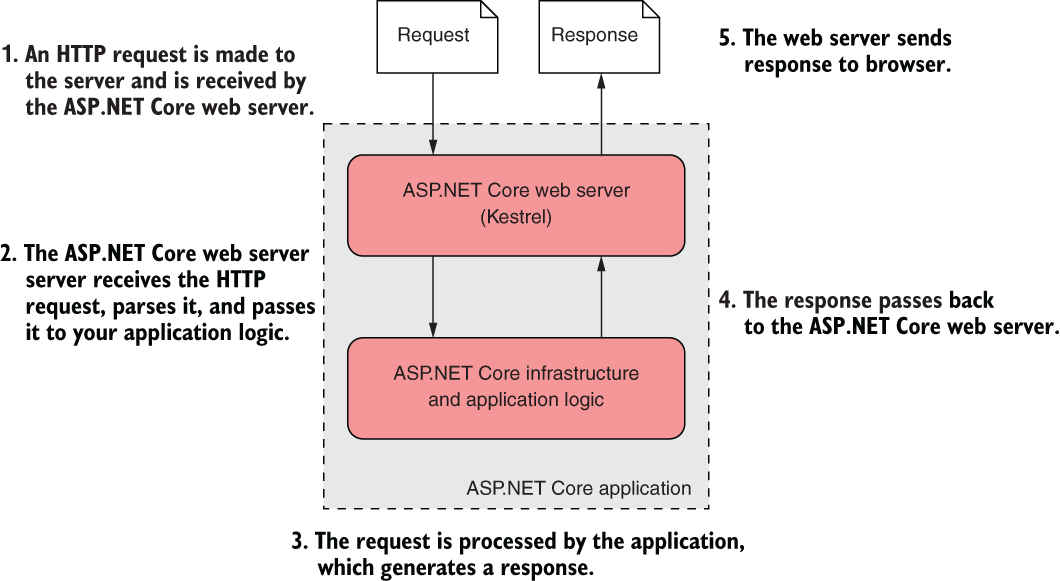
Trace the request from the browser through the self-hosted ASP.NET Core web server, into the application, and back as an HTTP response. section 1.4.2










