liveBook · Manning

File system abstraction

As explained in Crack Any Codebase with AI

A file system abstraction provides a uniform interface for accessing files across physical, remote, and virtual storage systems.

A file system abstraction gives editor code one interface for storage that may be local, remote, or virtual. It hides where files live, so higher-level features can work without separate implementations for each storage system. section 3.1

One editor, several storage locations

The same editor code can open a local file, a remote SSH folder, or an unsaved scratch buffer. The URI abstraction supplies a uniform address; the file system abstraction hides whether the underlying resource is on disk, a remote server, or a virtual file system. section 3.1

Figure 3.2 The ten core abstractions in VS Code, distilled from 10,000 files. The arrows show a recommended learning path, starting with foundational code like Resource Cleanup and ending with visible UI like the Workbench Layout.
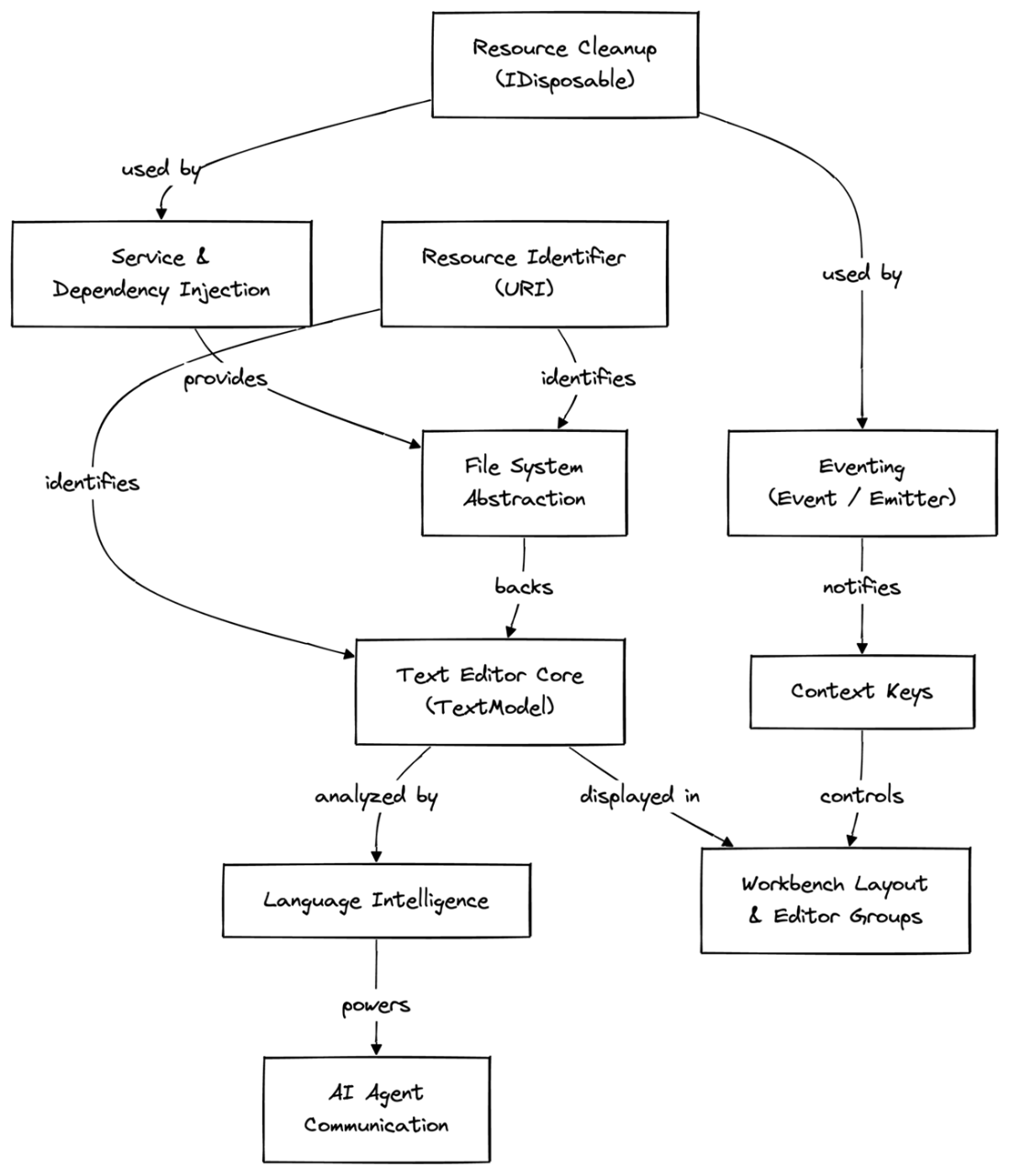
Use the dependency map to place file system abstraction beneath text editing and language features, and above the URI abstraction. section 3.1

How Crack Any Codebase with AI covers it

How deep it goes
Defines the abstraction's boundary and dependencies but stops short of implementation details.
Examples
Uses local files, remote SSH folders, unsaved scratch buffers, and virtual file systems as storage cases.
What it assumes
Assumes familiarity with files and editors while connecting storage access to URI abstraction.
What you can do after
Evaluate editor architecture by tracing storage dependencies into text editing and language features.
How it connects
Connects URI abstraction, Text Editor Core, Language Intelligence, and Dependency Injection.

This explainer was generated by Manning's knowledge graph from the text of Crack Any Codebase with AI. The section links point to the parts of the book it draws on.