liveBook · Manning

Identity area

As explained in ASP.NET Core in Action, 3e

The Identity area is the ASP.NET Core Identity UI area containing pages for user registration, login, and account management.

The Identity area is a separate Razor Pages hierarchy for ASP.NET Core Identity UI, keeping account functionality apart from the application’s main Pages folder. section 23.3.2

Use the default Identity area to:

  • Find the generated Identity UI under Areas/Identity/Pages. section 23.3.2
  • Override a default page by creating a corresponding page in your application’s Areas/Identity/Pages folder. section 23.3.2
  • Reuse the application layout through an Identity-area _ViewStart.cshtml file. section 23.3.2
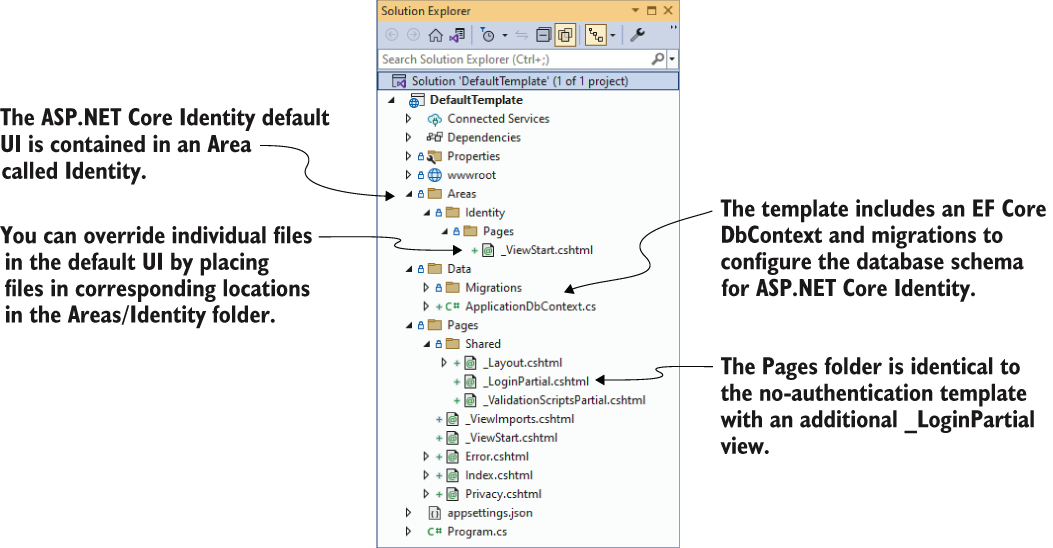
Figure 23.6 The project layout of the default template with individual authentication
CH23_F06_Lock3

Use the project-layout figure to locate the Identity area alongside the application’s Pages, Data, and shared files. section 23.3.2

How ASP.NET Core in Action, 3e covers it

How deep it goes
Explains its location, layout integration, and page-override mechanism, while deferring the complete default-page inventory.
Examples
Uses Areas/Identity/Pages, _ViewStart.cshtml, and Login links as concrete navigation and customization examples.
What you can do after
Apply it via ASP.NET Core Identity by locating, styling, or selectively overriding generated account pages.
How it connects
Connects areas with Razor Pages, ASP.NET Core Identity UI, layouts, and EF Core application data.

This explainer was generated by Manning's knowledge graph from the text of ASP.NET Core in Action, 3e. The section links point to the parts of the book it draws on.