`iloc` selects pandas data by integer position. Use it when the order of values or rows matters more than their labels: position 0 is first, and negative positions count backward from the end. Positional slices follow normal Python behavior, so the stop position is excluded. section 1.3 section 6.2
For a Series with month labels, `s.iloc[:5]` still means the first five values, regardless of those labels. This differs from `loc`: `s.loc['Sep':'Jan']` selects by label and includes January. Choosing between them makes the selection rule visible in the code. section 1.3
Use positional selection to answer order-based questions:
- Take an initial segment with `s.iloc[:5]`, then calculate a result such as its mean. section 1.3
- Take a final segment with `s.iloc[-20:]`; the negative start counts from the end. section 6.2
- Retrieve a DataFrame row by its row position with `df.iloc[0]`; square brackets normally select columns instead. section 2.0
Average the 20 longest taxi rides
After sorting taxi rides by `trip_distance` in descending order, select `total_amount` and then use `.iloc[:20]`. The positions now represent rank in the sorted result, whereas the original index labels remain unordered. Chain `.mean().round(2)` to obtain the rounded average. With ascending sorting, use `.iloc[-20:]` for the same longest-trip group. section 6.2
Figure 6.3 Running sort_values on a data frame, then keeping only one column, and then getting only the first rows with iloc
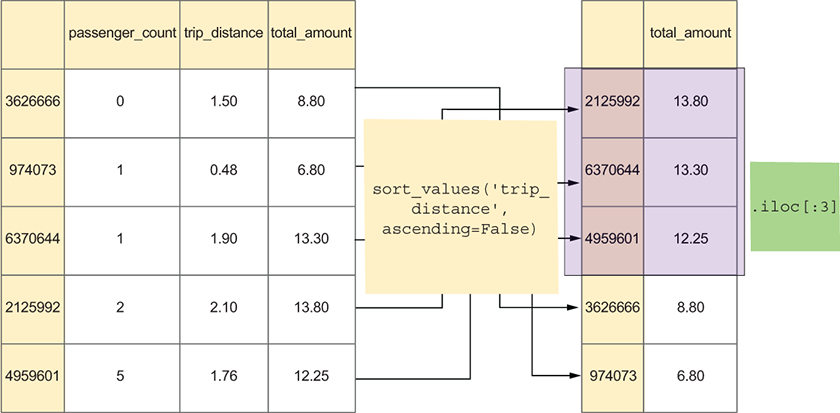
Inspect the compact chain that sorts rides, selects one column, and keeps its first 20 positional values. section 6.2
A useful check is to ask whether “first” means a label or a current position. After sorting, use `iloc` for a fixed number of rows; using `loc[:20]` would follow index labels and can return more rows than intended. section 6.2
