An ILoggerProvider determines where ASP.NET Core log messages go. A console provider writes to the console; a file provider writes to a file. Your application writes messages through ILogger rather than calling a provider directly, so you can change destinations without changing the code that creates each message. section 26.1.2 section 26.3
Figure 26.3 The components of the ASP.NET Core logging framework. You register logging providers with an ILoggerFactory, which creates implementations of ILogger. You write logs to the ILogger, which delegates to the ILogger implementations that write logs to the console or a file. You can send logs to multiple locations with this design without having to configure the locations when you create a log message.
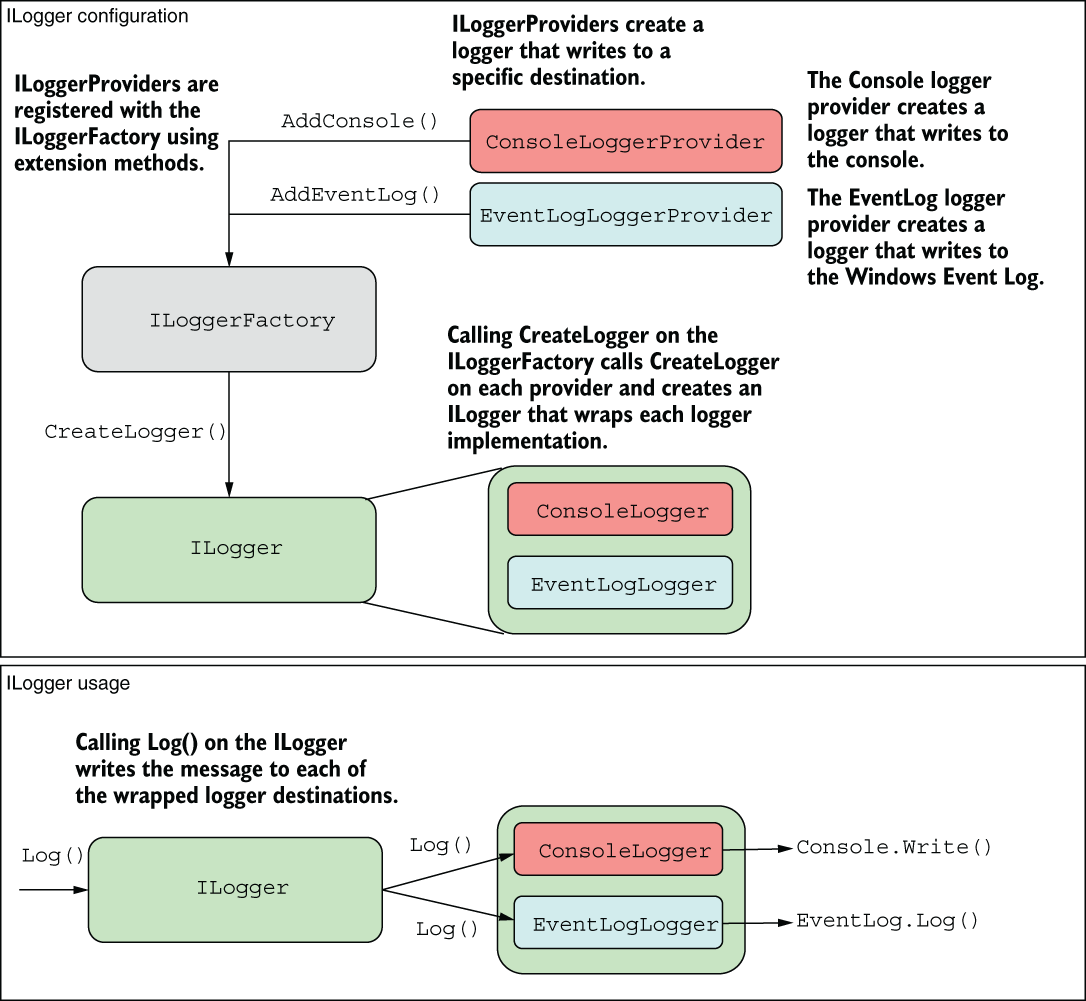
The diagram shows how ILoggerFactory connects configured providers to the ILogger used by application code. One log call can reach multiple destinations. section 26.1.2
WebApplicationBuilder already adds console and debug providers. To add another destination, register another provider through builder.Logging. ILoggerFactory then creates a logger that sends eligible messages to each configured provider. section 26.3 section 26.1.2
Keep console logs and add a file
Install NetEscapades.Extensions.Logging.RollingFile with `dotnet add package NetEscapades.Extensions.Logging.RollingFile`, then call `builder.Logging.AddFile()` after `WebApplication.CreateBuilder(args)`. The file provider is added alongside the existing providers; code that uses ILogger does not need to change. section 26.3
Providers can receive different subsets of messages. Filtering considers the log level, logger category, and provider; the most specific applicable rule decides whether a provider writes a message. For example, you can keep detailed file logs while requiring Error-level messages on the console. This helps reduce production noise without removing useful development detail. section 26.4
Destination is not the only choice: providers also differ in how they handle log data. A message such as `"Loaded {RecipeCount} recipes"` supplies a named value that some providers can retain for searching. The default console format displays the completed message but does not make that value searchable by key; JSON console output or a structured logging provider can preserve more structure. Providers also decide how to handle data attached through logging scopes. section 26.2.3 section 26.5.2

