liveBook · Manning

Image layer

As explained in .NET in Action, Second Edition

A container image layer is a separate immutable filesystem change produced by an image-build step and stored as part of the image.

An image layer is a separate, immutable filesystem change produced by an image-build step and stored as part of a container image. Docker typically creates one layer per Dockerfile instruction, allowing unchanged steps to be reused from cache. section 13.3.1

Use layers deliberately when structuring a Dockerfile:

  • Split large build operations into smaller steps so more work can be cached. section 13.3.1
  • Copy a project file and run dotnet restore before copying source files; unchanged project files preserve the restored-package layer. section 13.3.1
  • Use a multi-stage Dockerfile to publish with the SDK image and copy only the published output into the runtime image. section 13.3.1
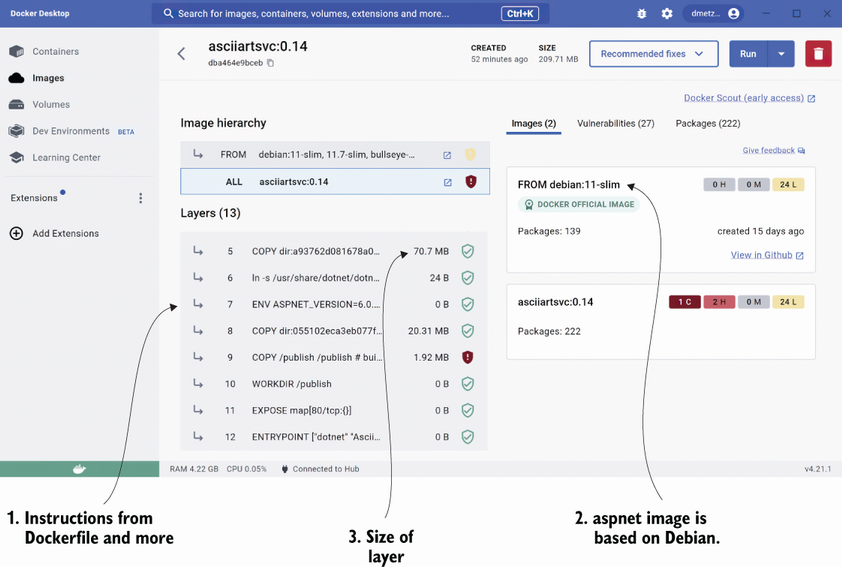
Figure 13.4 Docker Desktop with the asciiartsvc image open to the Layers section

Inspect the image's Layers section to see the separate build results retained in the container image. section 13.3.1


How .NET in Action, Second Edition covers it

How deep it goes
Explains layer creation, cache invalidation, Dockerfile ordering, and multi-stage composition without detailing storage internals.
Examples
Uses a .NET 6 Dockerfile, a separate restore step, and Docker Desktop's Layers section as concrete examples.
What it assumes
Assumes Dockerfile and container-image familiarity while demonstrating layer behavior through .NET publishing workflows.
What you can do after
Apply it by ordering Dockerfile steps to preserve cached dependencies and produce smaller multi-stage images.
How it connects
Connects image layers with Dockerfiles, Docker build cache, dotnet restore, and multi-stage builds.

Also explained in

Compare how 5 books explain image layer →

Related concepts

This explainer was generated by Manning's knowledge graph from the text of .NET in Action, Second Edition. The section links point to the parts of the book it draws on.


