An image reference is the name Docker uses to find an image. A full reference has four parts: registry domain, account or organization, repository, and tag. For example, docker.io/diamol/golang:2e names the golang repository in the diamol organization on Docker Hub, with the tag 2e. When sharing an image, include enough detail to identify its repository on the intended registry. section 5.1
Figure 5.1 Anatomy of a Docker image reference
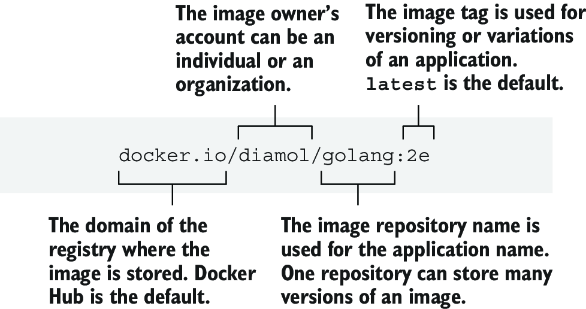
Use the diagram to locate each part of a full image reference. section 5.1
Docker supplies some parts when you omit them:
- Without a registry domain, Docker uses Docker Hub. diamol/golang:2e is short for docker.io/diamol/golang:2e. section 5.1
- Without a tag, Docker uses latest. diamol/golang is short for docker.io/diamol/golang:latest. section 5.1
- To target another registry, put its domain first, as in registry.local:5010/gallery/ui:v1. section 5.3
Give an existing image a shareable name
If you built image-gallery locally, set dockerId to your Docker Hub username, then run docker image tag image-gallery $dockerId/image-gallery:v1. This adds a reference; it does not rebuild the image. Check the references with docker image ls, log in with docker login --username $dockerId, and upload with docker image push $dockerId/image-gallery:v1. You can push to your own account or an organization you can access. section 5.2
The same tagging approach works for a registry you run yourself: docker image tag image-gallery registry.local:5010/gallery/ui:v1. A local registry using plain HTTP needs explicit Docker Engine configuration before Docker will push to it. The example registry has no authentication or authorization, so do not treat that setup as production-ready. section 5.3
