Image vectorization converts raster or scanned image data into geometric representations such as lines, circles, splines, or smooth curves. It replaces pixel-scale boundaries with shapes that remain useful when scaled or edited. section 12.4
Why vectorize an image?
A satellite image becomes more useful as a map when roads remain straight during zooming. Similarly, vectorizing scanned blueprints makes their geometry editable in modern CAD software instead of leaving it as an unmodifiable raster. section 12.4
A teaching-oriented vectorization pipeline follows these ideas:
- Start with an 8-bit, one-channel image whose values range from 0 to 255, and choose a threshold such as 128 to separate dark from light. section 12.4.1
- Place contour segments between neighboring cells whose values lie on opposite sides of the threshold, producing an initial pixel-scale boundary. section 12.4.2
- Replace the rough pixel border with smooth curves, using geometric ideas including signed distance functions, partial derivatives, and tangent vectors. section 12.4.2 section 12.4.6
Figure 12.18 The difference between raster and vector graphics (Yug, modifications by 3247 [CC BY-SA 2.5])
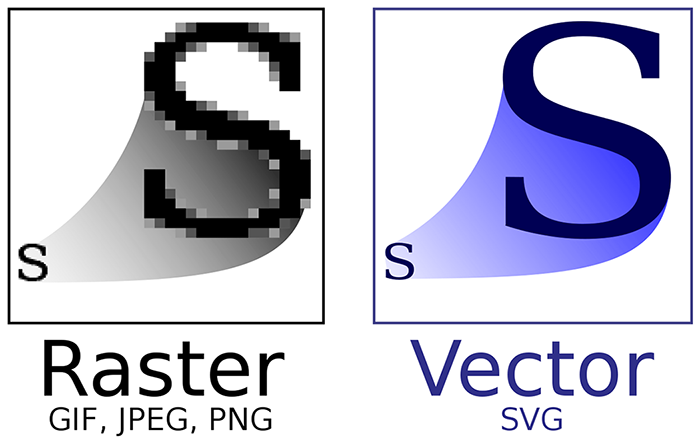
Compare raster graphics, whose detail is tied to square grid cells, with vector graphics, whose geometric features scale smoothly. section 12.4
The basic algorithm demonstrates the mathematics clearly but is not a practical replacement for advanced vectorization software: an artist can produce a better result quickly, and practical systems need more elaborate algorithms. section 12.4.6
