An immutable server is launched from an image and not changed afterward. When the application changes, build a new image and replace the existing server with a new instance. section 15.3 section 15.5
Treat every change as an image-building and rollout operation rather than an edit to a running machine. This makes deployments easier to reproduce and avoids accumulating undocumented changes. section 15.5 section 15.4
A practical AWS workflow uses these steps:
- Define a Packer template with a source AMI, EC2 build settings, an IAM instance profile, and a provisioner script. section 15.3
- Launch a temporary EC2 instance, connect through Systems Manager, install dependencies, copy application code, and create an AMI. section 15.3
- Pass the AMI ID to a CloudFormation launch template, then let an Auto Scaling group replace instances through a rolling update. section 15.3
Etherpad AMI rollout
Run `packer init` and `packer build` to create an Etherpad AMI. Deploy it with CloudFormation by supplying the AMI ID, then update the Auto Scaling group so new instances use the image.
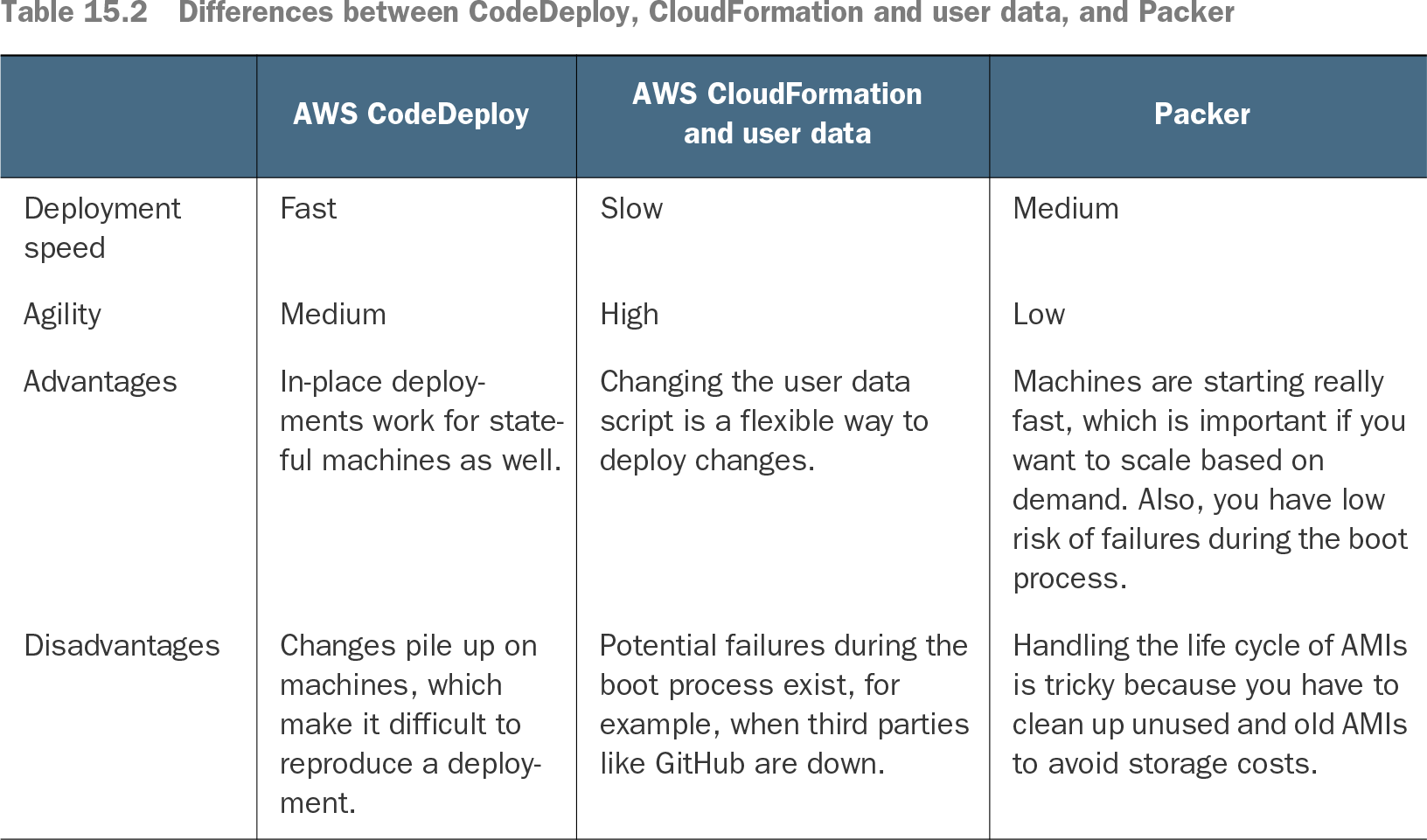
Table 15.2 Differences between CodeDeploy, CloudFormation and user data, and Packer (view table figure)
Compare immutable AMI deployments with CodeDeploy and CloudFormation user-data deployments, including speed, agility, and operational trade-offs. section 15.4