An in-sync replica (ISR) is a Kafka partition replica that has caught up with its leader and is not substantially lagging. Replicas pull new records asynchronously, so followers can temporarily contain less data than the leader. The ISR identifies the replicas currently eligible to support reliable writes and leader failover. section 2.3.1
The ISR connects replication health to write behavior. With acks=all, a producer can receive success only after records are replicated to all in-sync replicas. The min.insync.replicas setting requires a minimum ISR count; if the count falls below it, producers receive an exception rather than accepting a potentially unsafe write. section 2.3.1 section 2.3.2
Use ISR configuration to make an explicit durability–availability trade-off:
- Favor durability by maintaining multiple replicas, requiring acknowledgments from all ISRs, and tolerating downtime when too few remain. section 11.3.2
- Favor availability by allowing producers to continue with fewer acknowledgments, accepting that a failure may lose some messages. section 11.3.2
- Treat broker failure or overload as an operational ISR risk because replication delays can remove replicas from the in-sync set. section 2.3.2
A resilient partition configuration
A replication factor of 3 with min.insync.replicas set to 2 keeps a partition writable after one broker fails, provided two replicas remain caught up. If fewer than two ISRs remain, writes fail instead of weakening the durability guarantee. section 2.3.2
Figure 2.10 Each partition has one replica designated as the leader, while the others serve as followers.
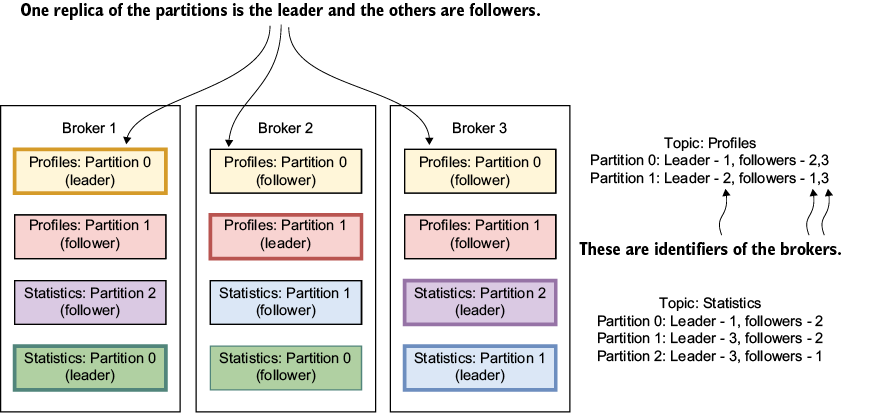
Use the partition diagram to distinguish the leader from follower replicas and understand where ISR membership applies. section 2.3.1
Table 11.2 Balancing durability and availability
| Configuration setting |
Improve durability |
Improve availability |
Setting type |
|---|---|---|---|
|
|
Use |
With |
Producer |
|
|
Enable to avoid duplicate messages and improve reliability |
Enable to avoid duplicate messages and retries in the producer |
Producer |
|
|
Disable and manually commit offsets after processing to avoid data loss |
Consumer progresses without waiting for manual commit logic to complete |
Consumer |
|
|
Set to |
Set to |
Consumer |
|
|
Smaller batches reduce memory pressure and risk of data loss during failure |
Larger batches improve consumer throughput and avoid stalling (but may risk larger reprocesses) |
Consumer |
|
|
Reduce to catch slow consumers faster and avoid stale offsets |
Increase to allow slower consumers to stay in group longer |
Consumer |
|
|
Reduce to detect dead consumers quickly and maintain ISRs |
May be increased to avoid unnecessary rebalances, but for detecting dead consumers it can be decreased |
Consumer |
|
|
Use a higher replication factor for better data redundancy |
A lower replication factor can speed up recovery but risks data loss |
Broker |
|
|
Set higher to ensure more replicas are in sync before committing data |
Set lower to allow writes even with fewer in-sync replicas |
Broker |
|
|
Disable to avoid data loss with unclean leader election |
Enable to allow faster leader election even if some data is lost |
Broker |
|
|
Distribute replicas across racks to avoid rack failures causing data loss |
Ensure rack awareness for faster recovery if a rack fails |
Broker |
|
|
Reduce to flush data more frequently to disk, minimizing potential data loss |
Increase to flush data less frequently for faster throughput |
Broker |
|
|
Reduce to flush data to disk more frequently |
Increase to flush less often and improve broker throughput |
Broker |
|
|
Increase to reduce the window in which durability is weakened |
Increase to speed up broker recovery after a crash |
Broker |
|
|
Increase to reduce the risk |
Increase to maintain availability during maintenance or failures |
Broker |
|
|
Reduce to quickly detect lagging replicas and exclude them from ISRs |
Increase to tolerate more lag and avoid unnecessary ISR changes that can affect availability |
Broker |
|
|
Disable to keep leaders stable, avoiding leader changes that can affect |
Enable to allow automatic rebalancing of leaders, improving availability during broker failures |
Broker |
Use the configuration table to compare durability- and availability-oriented choices for acknowledgments, idempotence, offset commits, isolation, and batch size. section 11.3.2


