Inactivity aging is a Port Security mode in which a secure MAC address’s aging timer resets whenever the switch receives a frame from that address. Unlike absolute aging, it keeps active secure addresses in the MAC address table. section 12.2.2
Key operational facts:
- Configure it per port with switchport port-security aging type inactivity. section 12.2.2
- Set a nonzero aging time separately; the default aging time is 0 minutes, so secure MAC addresses do not age out. section 12.2.2 section 12.3
- Apply static secure MAC aging separately with switchport port-security aging static; static secure addresses do not age by default. section 12.2.2
Configure and verify inactivity aging
SW1(config)# interface f0/1 SW1(config-if)# switchport port-security aging time 5 SW1(config-if)# switchport port-security aging type inactivity SW1(config-if)# do show port-security interface f0/1 Aging Time : 5 mins Aging Type : Inactivity SecureStatic Address Aging : Disabled section 12.2.2
Figure 12.7 Absolute vs. inactivity aging types. With absolute aging enabled, the aging timer does not reset upon receiving new frames from the same MAC. With inactivity aging enabled, the aging timer resets each time a new frame is received.
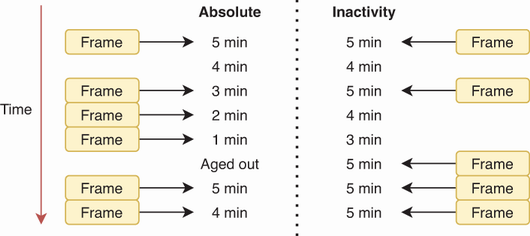
Compare absolute aging, which never resets on received frames, with inactivity aging, which resets whenever the secure MAC sends traffic. section 12.2.2
