liveBook · Manning

Indexing api

As explained in Elasticsearch in Action, Second Edition

The Elasticsearch Index API adds or updates a document in an index.

The Indexing API loads documents into Elasticsearch. It supports individual document operations, while related multi-document APIs handle batch imports such as a product catalog. section 5.0

Use document APIs according to the operation and scale:

  • Index documents individually for events such as e-commerce orders or tweets. section 5.0
  • Use the bulk endpoint for batch imports, such as moving millions of product records from a database into Elasticsearch. section 5.0
  • Combine indexing with read/search, update, delete, and reindexing APIs when managing a document store. section 5.0

Loading a product catalog

A product catalog stored in a database can be imported into Elasticsearch to enable product search. Individual records can be indexed one at a time; millions of records are better handled through the _bulk endpoint. section 5.0

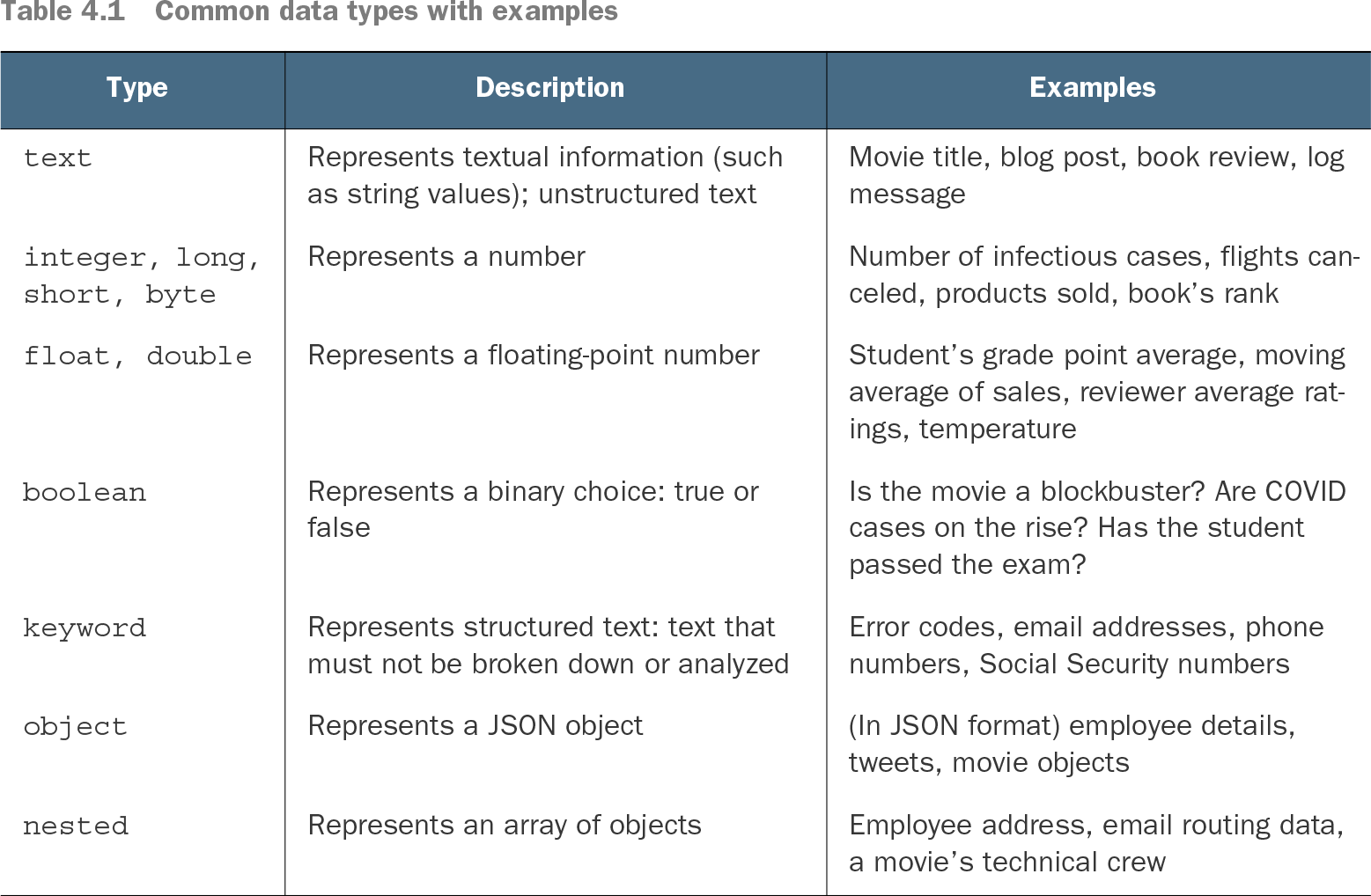
Table 4.1 Common data types with examples (view table figure)

Type

Description

Examples

text

Represents textual information (such as string values); unstructured text

Movie title, blog post, book review, log message

integer, long, short, byte

Represents a number

Number of infectious cases, flights canceled, products sold, book’s rank

float, double

Represents a floating-point number

Student’s grade point average, moving average of sales, reviewer average ratings, temperature

boolean

Represents a binary choice: true or false

Is the movie a blockbuster? Are COVID cases on the rise? Has the student passed the exam?

keyword

Represents structured text: text that must not be broken down or analyzed

Error codes, email addresses, phone numbers, Social Security numbers

object

Represents a JSON object

(In JSON format) employee details, tweets, movie objects

nested

Represents an array of objects

Employee address, email routing data, a movie’s technical crew

Choose field types deliberately when defining the index schema: text supports unstructured text, keyword preserves structured text, numeric types represent numbers, and object represents JSON objects. section 4.4

How Elasticsearch in Action, Second Edition covers it

How deep it goes
Distinguishes single-document indexing from bulk processing but does not detail request syntax or response handling.
Examples
Uses orders, tweets, and database-backed product catalogs as indexing scenarios.
What it assumes
Assumes a document-oriented Elasticsearch workflow and connects schema definitions with indexed field types.
What you can do after
Operate document loading by selecting individual indexing or bulk processing for the workload.
How it connects
Connects indexing with mapping, search, update, delete, bulk, and reindexing APIs.

Related concepts

This explainer was generated by Manning's knowledge graph from the text of Elasticsearch in Action, Second Edition. The section links point to the parts of the book it draws on.