inline-size sets an element’s size along its inline axis instead of prescribing a physical width or height. In horizontal writing modes it behaves like width; in vertical writing modes it adapts to the corresponding height. section 3.1.2
Use inline-size when the layout should follow writing-mode directions:
- Prefer inline-size to width when the element must remain correct across horizontal and vertical writing modes. section 3.1.2
- Remember that a block-level input may not fill its container automatically; inline-size: 100% forces the intended available inline size. section 4.3.2
- Use block-size as the logical counterpart when controlling the dimension along the block axis. section 3.1.2
Full-width login fields
A login form can make text and password fields occupy the form’s available inline space without relying on the input element’s size attribute: .login-form input:not([type=checkbox]):not([type=radio]) { display: block; inline-size: 100%; } The selector leaves checkbox and radio inputs untouched, while inline-size: 100% overrides their default character-based width. section 4.3.2
Figure 3.5 Inline and block directions in various writing modes
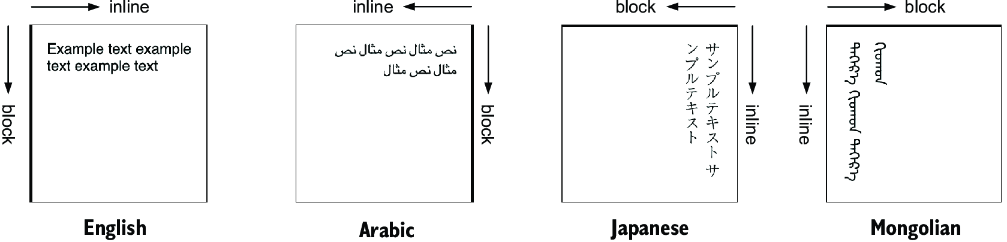
Compare inline and block directions across writing modes to see why logical sizing can change physical orientation. section 3.1.2
