An EC2 instance family groups instance types with similar characteristics. The family points to the kind of workload a virtual machine is suited to; the instance type specifies a size, primarily through its virtual CPU count and memory. Choose a family for the resources your application needs, then choose a type within it. section 3.1.1
Common families emphasize different resources:
- T offers a moderate, inexpensive baseline with short bursts of higher performance; M balances CPU and memory for general use. section 3.1.1
- C emphasizes CPU performance; R provides more memory relative to CPU than M; X offers extensive capacity focused on memory. section 3.1.1
- D and I emphasize storage, using large HDD and SSD capacities respectively. P, G, and CG use GPUs for accelerated computing; F uses FPGAs. section 3.1.1
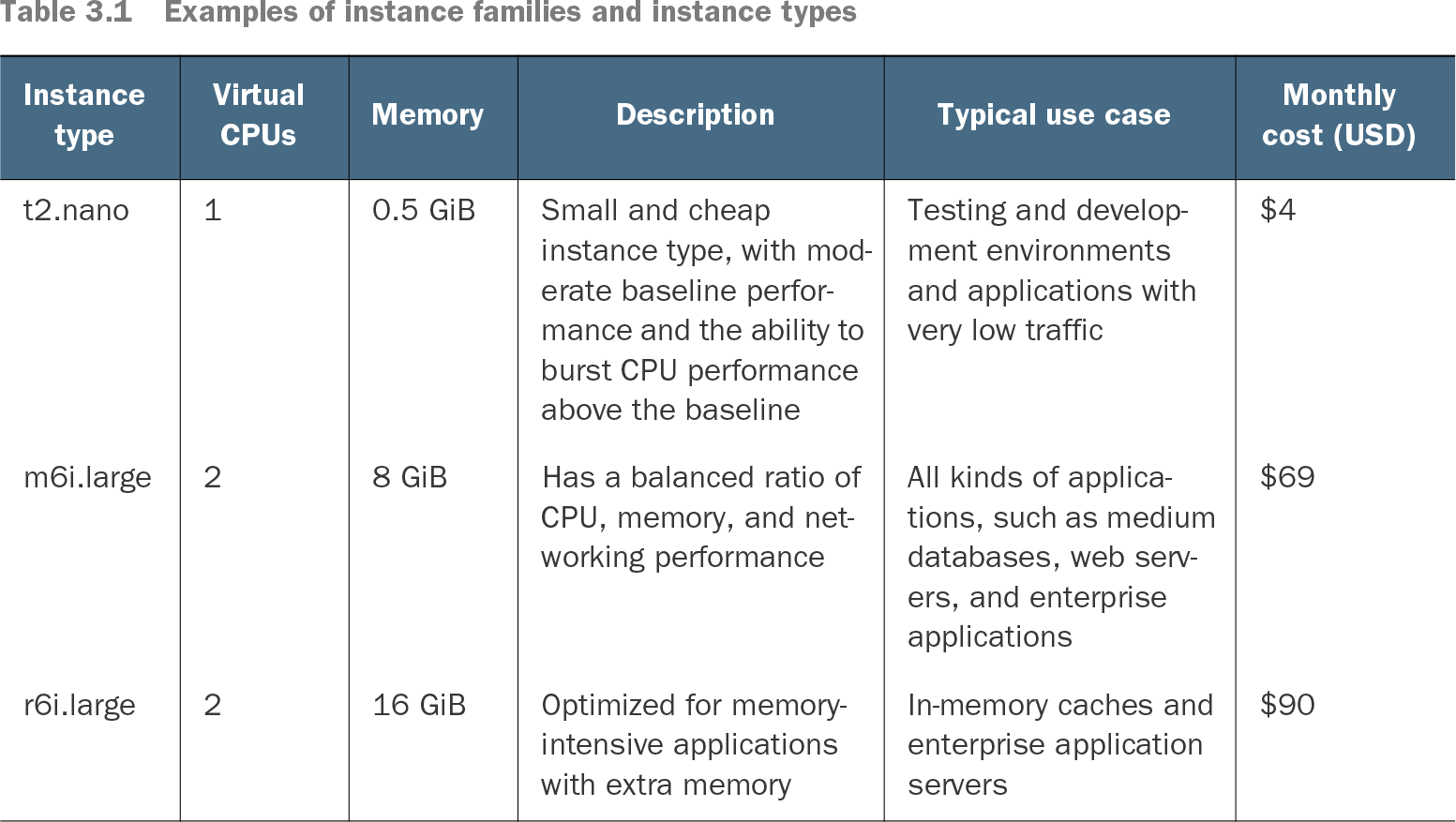
Table 3.1 Examples of instance families and instance types (view table figure)
Compare the listed CPU counts, memory, typical uses, and example costs: t2.nano suits low-traffic testing, m6i.large suits general applications, and r6i.large offers extra memory for caches or application servers. The listed prices were recorded for Linux instances in US East (N. Virginia) on April 5, 2022; check current pricing before choosing. section 3.1.1
Start smaller than you expect to need, then inspect the virtual machine’s CPU, memory, and networking needs if performance suffers. You can change its family, generation, or type later: stop the instance in the EC2 console, choose Actions → Instance Settings → Change Instance Type, apply the new type, and start it again. A larger type may improve performance but incurs charges. section 3.1.1 section 3.4
Family choice can also affect billing commitments. An EC2 Instance Savings Plan specifies an instance family and region alongside its term, hourly commitment, and payment option. It changes billing, not the running instance; unlike a Compute Savings Plan, it does not extend to a move from EC2 to Fargate. A one- or three-year commitment incurs costs, so consider flexibility before committing. section 3.8.1