An instance store volume is block-level storage on the physical machine hosting an EC2 instance. It is available only while that instance runs: stopping or terminating the instance destroys its data, which cannot be restored. Unlike a network-attached EBS volume, an instance store is part of the instance, not a standalone resource. Its cost is included in the EC2 instance price. section 8.2
Figure 8.2 The instance store is part of your EC2 instance and uses the host machine’s HDDs or SSDs.
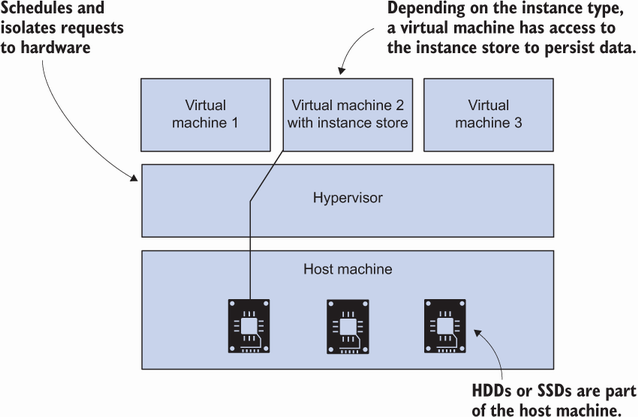
The diagram locates the instance store on the host machine, clarifying why the storage depends on the EC2 instance. section 8.2
Choose storage according to what happens if the data disappears:
- Use instance store for temporary files or a cache that can be rebuilt from its origin. section 8.2
- Use EBS instead when data must persist. Keeping replicated data on instance store can benefit from low latency and high throughput, but requires distributed-systems expertise. section 8.2
- Use EFS when multiple EC2 instances need to read and write the same filesystem; an instance store is local to one machine. section 9.0
Mount an instance store on Linux
Launch an instance type that includes instance storage, such as m6id.large, then connect with SSM Session Manager. Run `lsblk` to identify the instance-store device and `df -h` to check what is mounted. In the illustrated configuration, prepare `/dev/nvme1n1` with `sudo mkfs -t xfs /dev/nvme1n1`, create a mount point with `sudo mkdir /data`, and mount it with `sudo mount /dev/nvme1n1 /data`. Check `df -h` again before writing to `/data`. Confirm the device name before formatting; the illustrated root disk is a different device. The instance incurs charges, and m6id.large may not be available in every Availability Zone. On Windows instances, instance-store volumes are NTFS-formatted and mounted automatically. section 8.2 section 8.2.1
To test a workload rather than assume a fixed speed advantage, measure reads and writes against EBS. A sample `dd` test uses 1 MB blocks and reports faster instance-store results, but performance varies with the workload; a website serving many small files may behave differently. section 8.2.2
Instance store has no built-in backup mechanism. Scheduled jobs can copy data to S3, but needing backups is a reason to consider EBS instead. Local instance storage also prevents the described CloudWatch-alarm EC2 recovery process, which requires EBS volumes exclusively. Delete test resources when finished to avoid continued charges. section 8.2.3 section 13.1.1
