Instant file initialization skips zeroing newly created or expanded SQL Server data files, reducing delays during database growth. Grant the Database Engine service account the Perform Volume Maintenance Tasks right; recent installations and SQL Server Configuration Manager expose this setting directly. section 10.2
Avoid the common mistake of rejecting the feature solely because of its security implication:
- Understand the trade-off: without the feature, old disk contents are overwritten during file initialization; with it, remnants may theoretically remain until SQL Server allocates extents and writes pages. section 10.2
- Use instant file initialization in the vast majority of environments, avoiding it only where the security requirements are exceptionally strict. section 10.14
- Pair the setting with capacity planning and sensible file sizing; it removes zeroing delays but does not eliminate repeated growth caused by undersized files. section 10.0 section 10.2
A warehouse load that expands too often
An extract, transform, and load process repeatedly expanded undersized data files during nightly warehouse loads. Each expansion zeroed the new space because instant file initialization was disabled. Enabling it immediately resolved the delay, while capacity planning and resizing addressed the underlying growth pattern. section 10.0
Figure 10.2 Configuring instant file initialization
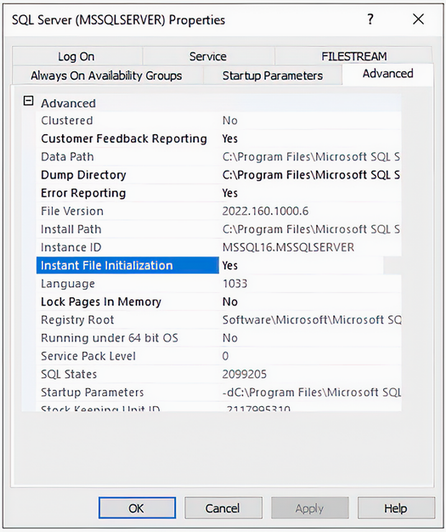
Open the configuration figure to see where instant file initialization is enabled for the Database Engine service. section 10.2
