An instruction tells an artificial-intelligence model what action or response to produce. Clear, direct language generally improves results and reduces errors. section 9.2
Write instructions that:
- Use simple language and avoid unnecessary jargon. section 9.2
- State the desired action or response directly, using active wording. section 9.2
- Break complex tasks into manageable steps. section 9.2
- Supply relevant context and concrete examples alongside the instruction. section 9.2
A practical instruction
Give the existing project as context, then ask: “Add the requested feature. Explain the changes briefly, divide the work into steps, and show the resulting code.” If the response misses the goal, continue the conversation and clarify the request. section 9.2
Figure 9.3 A good prompt starts with great context (usually provided by the tool). This includes your existing project. Next, you add good examples and clear instructions. The process is very similar to communicating verbally with a human.
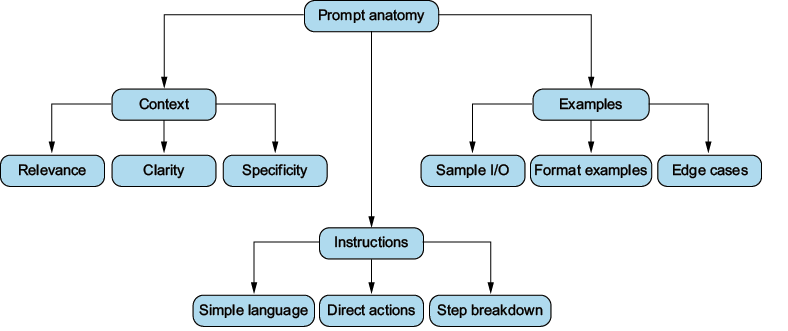
Use the prompt anatomy diagram to see how context, examples, and clear instructions work together. section 9.2




