A web interaction is a Screenplay-compatible operation that performs an action through a web interface without exposing the underlying browser-automation tool. It represents a low-level activity, such as navigating, clicking, scrolling, or entering a value, while the actor performs it through an ability. section 15.1.3 section 15.2.5
Unlike conventional WebDriver code, Screenplay models an interaction as an object rather than a method call. The actor passes that object to attemptsTo(), so new behavior can be added through new interaction classes without changing existing classes. section 12.5.2 section 12.11
Interactions fit into Screenplay’s layered model:
- Actors perform interactions using their abilities to access application interfaces. section 12.2
- Tasks compose interactions into reusable, higher-level business activities. section 15.1.3
- Questions retrieve application state for assertions rather than changing it. section 12.11
Composing a registration flow
A task can navigate to the home page and click the Register button: Navigate.to('/') followed by Click.on(Form.buttonCalled('Register')). The same interaction style can use Click.on(Toaster.message()) or Enter.the(value).into(input), while remaining independent of Playwright, WebdriverIO, or Selenium WebDriver. section 15.1.3 section 15.2.5
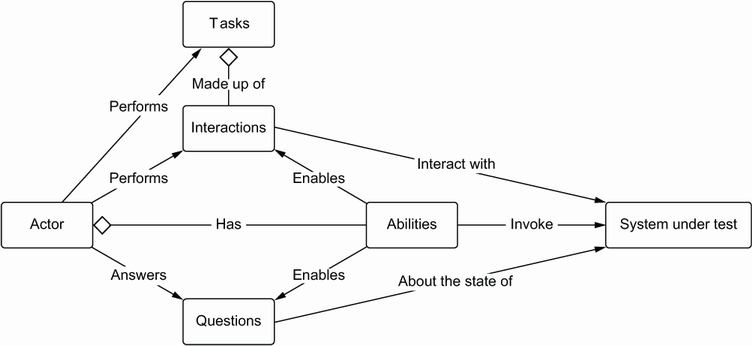
Use the actor-centric model to see how interactions connect actors, abilities, tasks, and questions. section 12.2
