An interactive user sign-in occurs when a user enters credentials or completes an authentication challenge, such as multifactor authentication, to access Azure resources. Microsoft Entra ID records the event for identity-access investigation. section 9.1.1
Review an interactive sign-in in the Azure portal:
- Open Microsoft Entra ID and select Sign-In Logs. section 9.1.1
- Filter by date and user, then open the relevant result. section 9.1.1
- Use Basic Info for event details, Location for the originating IP address and location, and Conditional Access for the applied policy. section 9.1.1
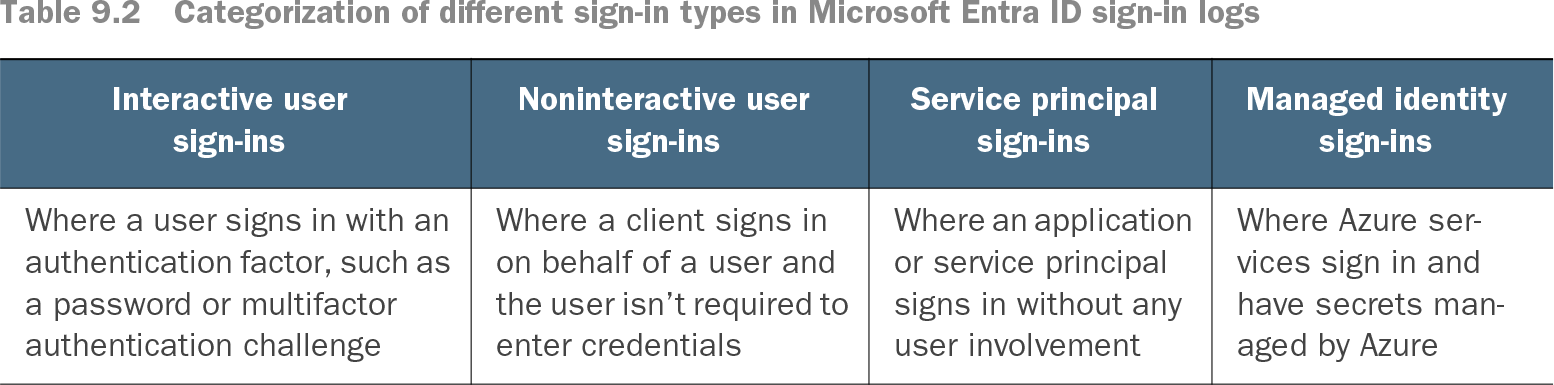
Table 9.2 Categorization of different sign-in types in Microsoft Entra ID sign-in logs (view table figure)
Compare interactive user sign-ins with noninteractive user, service principal, and managed identity sign-ins. section 9.1.1
Investigating Bob’s sign-in
After Bob enters his credentials, filter the sign-in logs for Bob, inspect the event location, and verify whether the Conditional Access policy applies. section 9.1.1