Use internal when an implementation detail should be available throughout one module but not exposed to external code. A module is a set of Kotlin files compiled together, such as a Gradle source set, Maven project, or IntelliJ IDEA module. section 4.1.3
Keep an implementation type inside the module
internal open class TalkativeButton { private fun yell() = println("Hey!") protected fun whisper() = println("Let's talk!") } fun TalkativeButton.giveSpeech() { // yell() and whisper() are not accessible here } // A public function cannot expose TalkativeButton: // fun useButton(button: TalkativeButton) = ... Here, TalkativeButton is usable by code compiled in the same module, while its private and protected members retain their narrower rules. The public API cannot reference the less-visible internal type. section 4.1.3
Apply internal with these practical boundaries:
- Use it for module implementation details that should have real encapsulation. section 4.1.3
- Remember that Gradle test source code can access internal declarations from the main source set. section 4.1.3
- Do not use packages as a Java-style package-private boundary; Kotlin packages organize namespaces but do not control visibility. section 4.1.3
- Choose private for a top-level class, function, or property that should be visible only within its declaring file. section 4.1.3
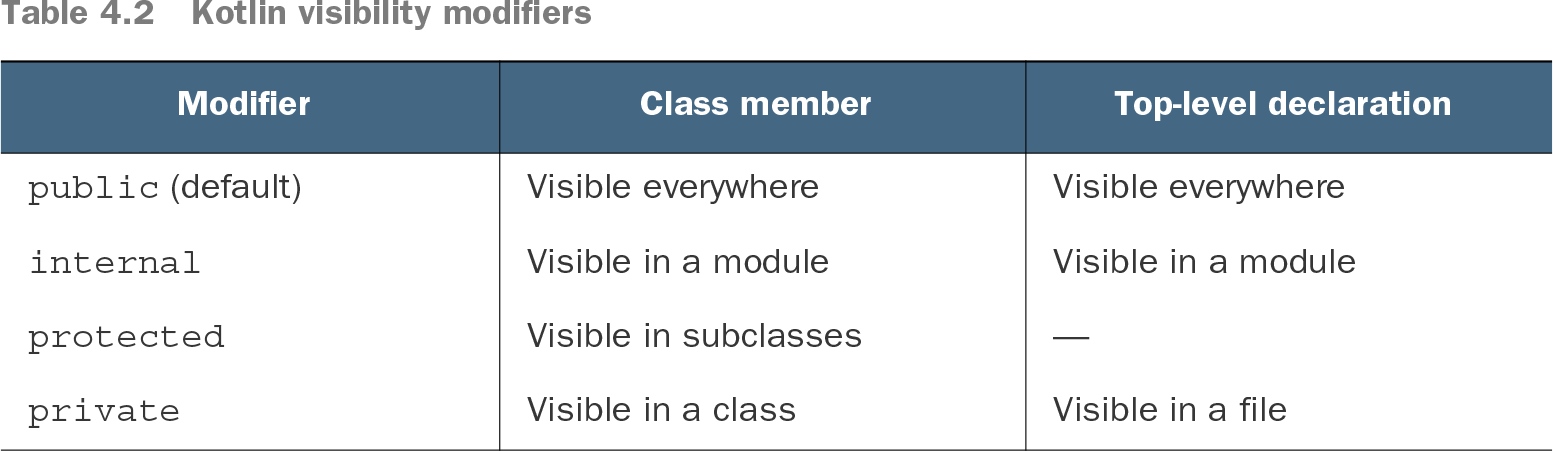
Table 4.2 Kotlin visibility modifiers (view table figure)
Compare internal with public, protected, and private visibility for class members and top-level declarations. section 4.1.3
Kotlin declarations are public by default, but internal provides a deliberate module boundary for APIs that should not become externally supported. This differs from Java's package-private convention, which can be weakened by code placed in the same package. section 4.1.3 section 4.6