Creates a named NAT pool containing inside global IPv4 addresses for dynamic NAT. The start and end addresses define the range, while prefix-length confirms that the addresses belong to one subnet. section 9.3.2
Configure dynamic NAT around the pool in three steps:
- Use an ACL to identify inside local addresses eligible for translation. section 9.3.2
- Create the pool with ip nat pool name start-ip end-ip prefix-length length, or use the netmask keyword. section 9.3.2 section 9.4
- Map the ACL to the pool with ip nat inside source list acl pool pool. section 9.4
- Assign pool addresses one-to-one on a first-come, first-served basis; permitted traffic without an available address is dropped. section 9.4
Cisco IOS configuration
R1(config)# access-list 1 permit 10.0.0.0 0.0.0.255 R1(config)# ip nat pool POOL1 192.0.2.1 192.0.2.5 prefix-length 29 R1(config)# ip nat inside source list 1 pool POOL1 POOL1 provides five inside global addresses. The /29 prefix validates the 192.0.2.1–192.0.2.5 range; the ACL selects inside local addresses, and the NAT statement connects both ranges. section 9.3.2
Figure 9.8 Dynamic NAT. An ACL is used to identify a range of inside local addresses, and a NAT pool is used to identify a range of inside global addresses. Addresses in the pool are assigned on a first come, first served basis.
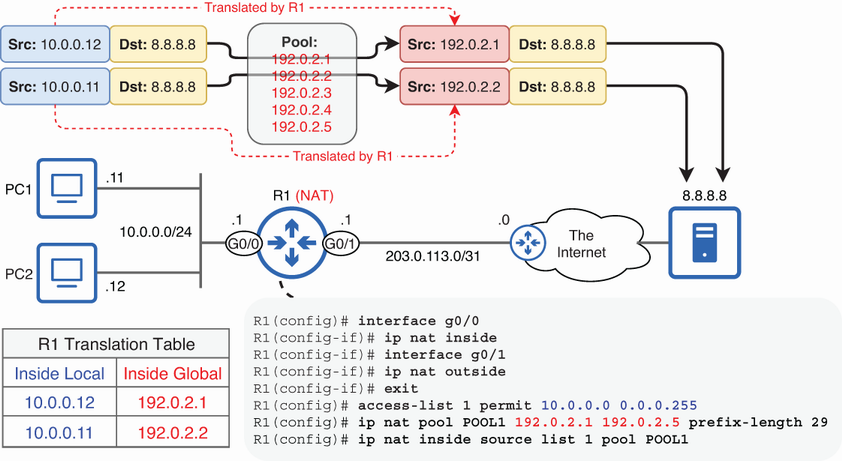
Shows how an ACL identifies inside local addresses while the NAT pool supplies inside global addresses for dynamic assignment. section 9.3.2
