ip route is a Cisco IOS global-configuration command for creating static routes. Its arguments identify a destination network, netmask, and either a next-hop IP address, an exit interface, or both. section 9.3.1
Common forms of the command include:
- ip route destination-network netmask next-hop configures a recursive static route. The router looks up the destination and then performs another lookup to find the interface connected to the next hop. section 9.3.1
- ip route destination-network netmask exit-interface specifies the outgoing interface. The route can appear as directly connected in show ip route output. section 9.3.1
- ip route destination-network netmask exit-interface next-hop specifies both forwarding details, allowing the routing table to show the next hop and exit interface. section 9.3.1
- ip route 0.0.0.0 0.0.0.0 next-hop creates a default route, matching destinations that do not match more-specific routes. section 9.3.2
Routing between three networks
In a three-router topology, R1 can reach 192.168.3.0/24 through next hop 192.168.12.2, while R2 and R3 receive corresponding routes to the other LANs. R1's show ip route output identifies the static route with code S. A separate route such as ip route 0.0.0.0 0.0.0.0 203.0.113.2 sends otherwise unmatched traffic toward the ISP. section 9.3.1 section 9.3.2
Figure 9.9 Configuring static routes on R1, R2, and R3 to enable two-way communication between PC1 and PC3. The routes specify the next-hop IP address. R1 requires a route to 192.168.3.0/24, R2 requires routes to 192.168.1.0/24 and 192.168.3.0/24, and R3 requires a route to 192.168.1.0/24.
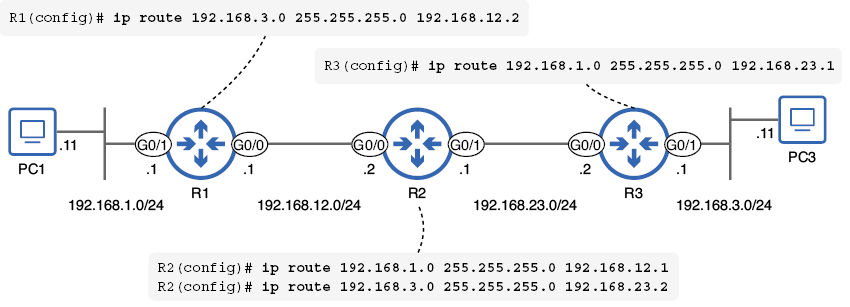
Use the topology to trace which static routes each router needs for two-way communication between PC1 and PC3. section 9.3.1
Figure 9.11 R1 has two routes to specific destination networks and one default route to the internet. (1) A route to 192.168.2.0/24, with R2 G0/0 as the next hop. (2) A route to 192.168.3.0/24, with R3 G0/0 as the next hop. (3) A default route, with the ISP’s IP address (203.0.113.2) as the next hop.
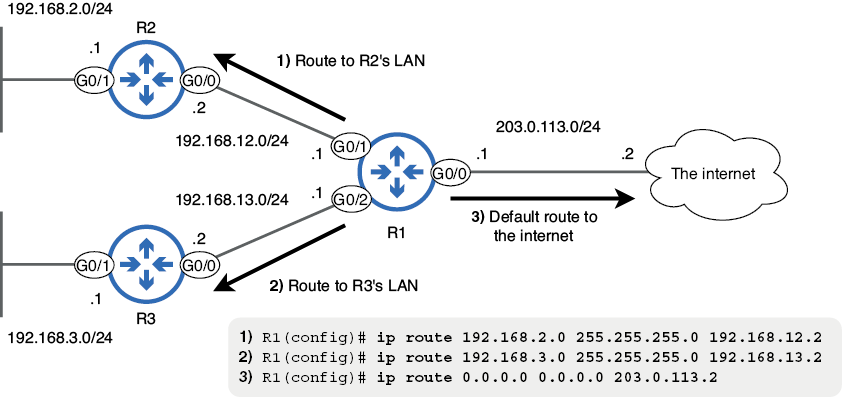
Use the diagram to compare specific routes with a default route toward the internet. section 9.3.2
