ipconfig is a Windows Command Prompt utility for viewing a device’s IPv4 address, subnet mask, and default gateway. These values help explain whether packets stay on the local network or travel through a router. section 9.1 section 9.4
Reading representative output
Running ipconfig on PC1 shows IPv4 Address 192.168.1.11, Subnet Mask 255.255.255.0, and Default Gateway 192.168.1.1. The gateway is an IP address; ARP resolves its MAC address when PC1 sends traffic to another network. section 9.1
Figure 9.2 PC1 (192.168.1.11) sends a packet to PC3 (192.168.2.11). Because PC1 and PC3 are in separate networks, PC1 sends the packet in a frame addressed to its default gateway’s MAC address—that of R1’s G0/0 interface. R1 then forwards the packet out of its G0/1 interface, encapsulated in a new frame addressed to PC3’s MAC address. This diagram assumes PC1 already knows R1 G0/0’s MAC address; if not, PC1 will send an ARP request to learn it. Likewise, R1 must also learn PC3’s MAC address.
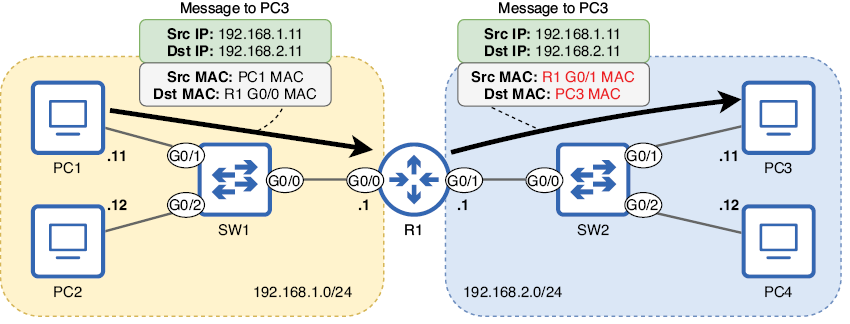
Trace how a host uses the default gateway when the destination belongs to a different network. section 9.1
