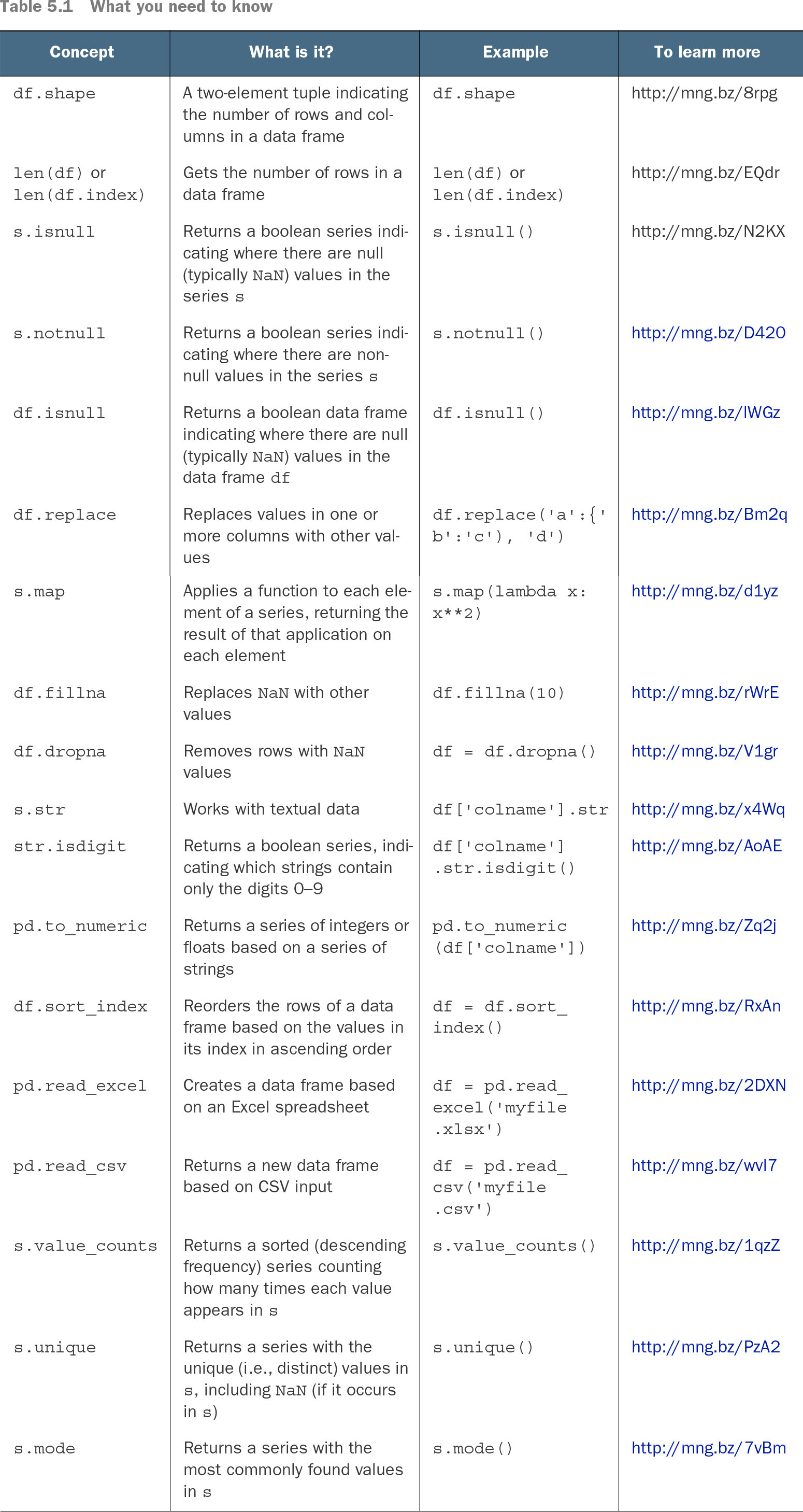
Think of isnull as a missing-data detector: applied to a Series, it returns True where values are NaN or otherwise null and False elsewhere. Applied to a DataFrame, it preserves the table’s shape while marking each row-column position. Summing the Boolean result counts missing values because True behaves like 1. section 5.0
Use the returned Boolean Series or DataFrame to answer practical cleaning questions:
- Count missing values in one column with `s.isnull().sum()`. section 5.0
- Count missing values column by column with `df.isnull().sum()`. section 5.0
- Inspect the full missing-value pattern with `df.isnull()`. section 5.0
- Compare missing values with the Series shape to estimate their proportion. section 5.6
Checking ages before conversion
For a celebrity-deaths dataset, test the `age` column before converting it to integers: `df['age'].isnull().sum() / len(df['age'])`. The resulting proportion is 0.004, or 0.4 percent. After assessing that loss, remove missing ages with `df.dropna(subset=['age'])`; later, `pd.to_numeric(..., errors='coerce')` provides another way to turn unparseable values into missing values. section 5.6
Table 5.1 What you need to know (view table figure)
Use the reference table to compare `s.isnull()` and `df.isnull()` with related shape, non-null, replacement, and mapping operations. section 5.0