A Java-to-Kotlin converter translates Java source into working Kotlin code, helping developers reuse existing Java knowledge while learning Kotlin or adopting it incrementally. section 1.5.1
Use the converter to:
- Express an unfamiliar Kotlin construct by writing the equivalent Java snippet and pasting it into a Kotlin file. section 1.5.1
- Convert an existing class before making substantial changes, then continue development using Kotlin features. section 1.5.1
- Convert a complete file with IntelliJ IDEA’s “Convert Java File to Kotlin File” action. section 1.5.1
Converting a class during migration
In an existing Java project, convert one class to Kotlin, let the remaining Java and Kotlin code continue working together, and then add the required changes. The generated result may need cleanup because it is functional but not always idiomatic Kotlin. section 1.5.1 section 1.4.4
Figure 1.2 When using the Find Usages action in IntelliJ IDEA, it finds results across Kotlin and Java files in the same project. Other IDE features, such as refactorings and navigation, work just as smoothly across both languages.
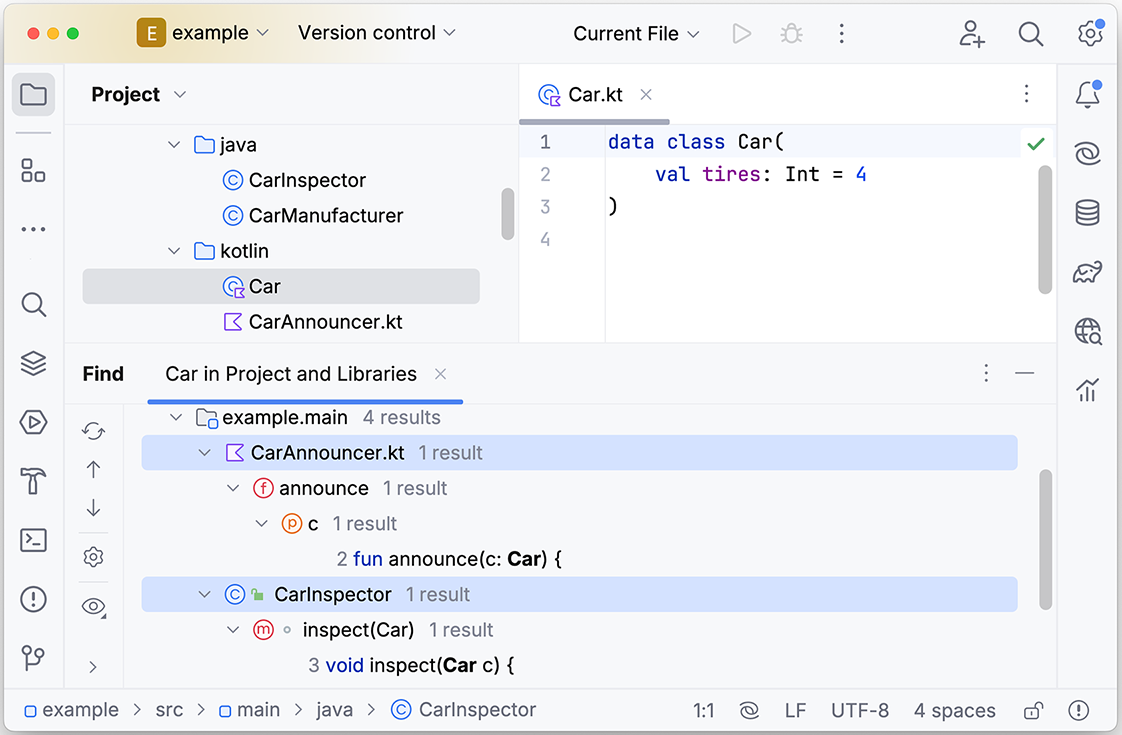
Cross-language Find Usages results illustrate how converted Kotlin classes remain integrated with Java code and IDE workflows. section 1.4.4
