A JDBC source connector moves records from relational database tables into Kafka topics. A customer table can therefore become the source for streaming customer data, with the topic name derived from a configured prefix and table name. section 11.8 section 11.8.2
Figure 11.6 We want to move customer data from a relational database to Kafka.
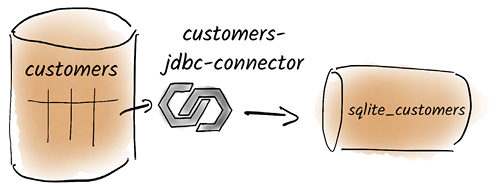
Use the data-flow diagram to follow customer records from a relational table into the sqlite_customers Kafka topic. section 11.8
Start with a SQLite database containing a customers table, insert sample rows, install the JDBC connector through Confluent Hub, place it on the worker's plugin.path, and restart Kafka Connect. section 11.8.1
A focused source configuration
Configure io.confluent.connect.jdbc.JdbcSourceConnector with a SQLite connection URL, JSON values without schemas, TABLE selection, a customers whitelist, the sqlite_ topic prefix, and incrementing mode using id. Submit the JSON configuration to the Kafka Connect REST endpoint; the resulting records appear in sqlite_customers. section 11.8.2 section 11.8.3
Treat polling mode and operational behavior as deployment decisions:
- Incrementing mode can capture newly inserted rows through an increasing identifier, but it does not capture updates to existing rows. section 11.8.2 section 11.8.3
- Timestamp-based capture can miss changes sharing the same timestamp, so it cannot guarantee that every database change reaches Kafka. section 11.8.3
- Bulk mode reloads the entire table each time and provides complete capture at a high efficiency cost; CDC connectors such as Debezium address this limitation. section 11.8.3
- Configure errors.tolerance, error logging, and connection retries deliberately; skipping faulty records should be paired with alerts or notifications. section 11.6.2

