JoinWindows defines the timestamp interval in which records from two Kafka Streams are eligible to produce a stream-stream join result. With a 30-minute window, a 12:00 coffee purchase can join a store purchase timestamped from 11:30 through 12:30. section 7.3.4
Configure the window according to the timing relationship your application accepts:
- Use JoinWindows.ofTimeDifferenceWithNoGrace(Duration.minutes(30)) for a symmetric maximum difference before or after the calling stream's timestamp. section 7.3.1 section 7.3.4
- Use after(Duration.ofMinutes(5)) to keep a 30-minute opening side but limit the secondary record to five minutes after the primary timestamp. section 7.3.4
- Use before(Duration.ofMinutes(5)) to limit the secondary record to five minutes before the primary timestamp while retaining the 30-minute closing side. section 7.3.4
Joining coffee and store purchases
A Kafka Streams application can create JoinWindows and pass it to KStream.join alongside a ValueJoiner and StreamJoined configuration: JoinWindows thirtyMinuteWindow = JoinWindows.ofTimeDifferenceWithNoGrace(Duration.minutes(30));. Kafka Streams stores records from both sides in windowed state stores, then looks up records with the same key whose timestamps fall within the configured interval. section 7.3.1 section 7.3.2
Figure 7.14 The JoinWindows configuration specifies the max difference (before or after) from the timestamp of the calling side the secondary side can have to create a join result.
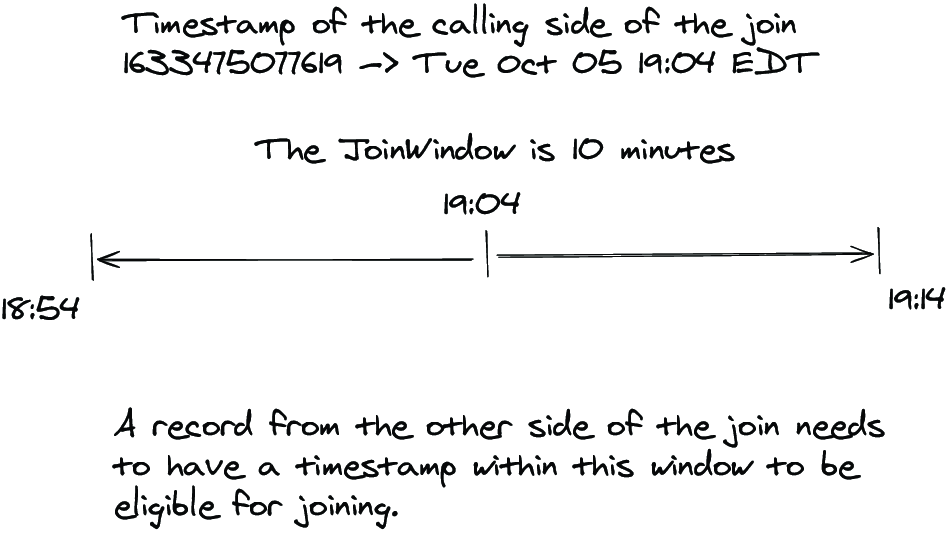
Use the timestamp diagram to see how the calling stream's timestamp anchors the allowed interval for the secondary stream. section 7.3.4
JoinWindows controls time matching, not partition alignment. Join participants must be co-partitioned with the same partition count and key type; record timestamps come from Kafka or a configured TimestampExtractor. section 7.3.5
