liveBook · Manning

Justify-self

As explained in Web Design Playground, Second Edition

The CSS justify-self property sets the alignment of an individual grid item along the inline axis within its grid area.

Use justify-self to align one grid item along the inline, or row, axis inside its grid area. It overrides the grid container’s shared alignment. section 13.9

Choose the item’s position with the same values available to justify-items:

  • start—place the item at the beginning of its grid area. section 13.9
  • end—place it at the end; center—place it in the middle; stretch—fill the available grid area. section 13.9

PLAY: Override one item

.special-item { justify-self: center; } section 13.9

Figure 13.4 Trying out the justify-items values
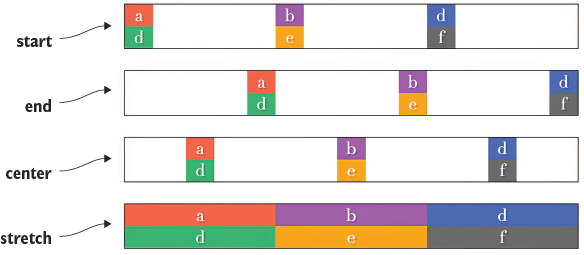
Compare the start, end, center, and stretch arrangements visually, then use the matching value on an individual grid item. section 13.9

How Web Design Playground, Second Edition covers it

How deep it goes
Defines four alignment values and their effect, but stops short of deeper grid-alignment mechanics.
Examples
Uses start, end, center, and stretch arrangements, supported by a visual comparison.
What you can do after
Apply it via CSS Grid to override one item’s inline-axis alignment.
How it connects
Connects CSS Grid Layout with grid items and the justify-items property.

Related concepts

This explainer was generated by Manning's knowledge graph from the text of Web Design Playground, Second Edition. The section links point to the parts of the book it draws on.