A JWT bearer token is a signed JSON Web Token sent as bearer credentials to authenticate API requests. ASP.NET Core can require it on selected endpoints and reject unauthenticated requests with 401 Unauthorized. section 25.3
Configure JWT bearer authentication in a minimal API by:
- Installing Microsoft.AspNetCore.Authentication.JwtBearer. section 25.3
- Registering authentication with AddAuthentication().AddJwtBearer() and registering authorization. section 25.3
- Adding authentication and authorization middleware to the request pipeline. section 25.3
- Calling RequireAuthorization() on endpoints that must receive authenticated requests. section 25.3
Protecting a recipe endpoint
A minimal API can map GET /recipe and call RequireAuthorization(). A request without a token receives a 401 Unauthorized challenge response. section 25.3
Listing 25.1 Adding JWT bearer authentication to a minimal API application
WebApplicationBuilder builder = WebApplication.CreateBuilder(args);

builder.Services.AddAuthentication()         #1
    .AddJwtBearer();                         #2
builder.Services.AddAuthorization();         #3

builder.Services.AddScoped<RecipeService>();

WebApplication app = builder.Build();

app.UseAuthentication();                     #4
app.UseAuthorization();                      #5

app.MapGet("/recipe", async (RecipeService service) =>
{
    return await service.GetRecipes();
}).RequireAuthorization();                   #6

app.Run();
#1 Adds the core authentication services
#2 Adds and configures JWT authentication
#3 Adds the core authorization services
#4 Adds the authentication middleware
#5 Adds the authorization middleware
#6 Adds an authorization policy to the minimal API endpoint
View the complete minimal API configuration, including service registration, middleware, and endpoint protection. section 25.3
Figure 25.11 Adding an Authorization header using Swagger UI. When adding the token, ensure that you enter Bearer <token>, including the Bearer prefix. Swagger UI then attaches the token to all subsequent requests, so you are authorized to call the API.
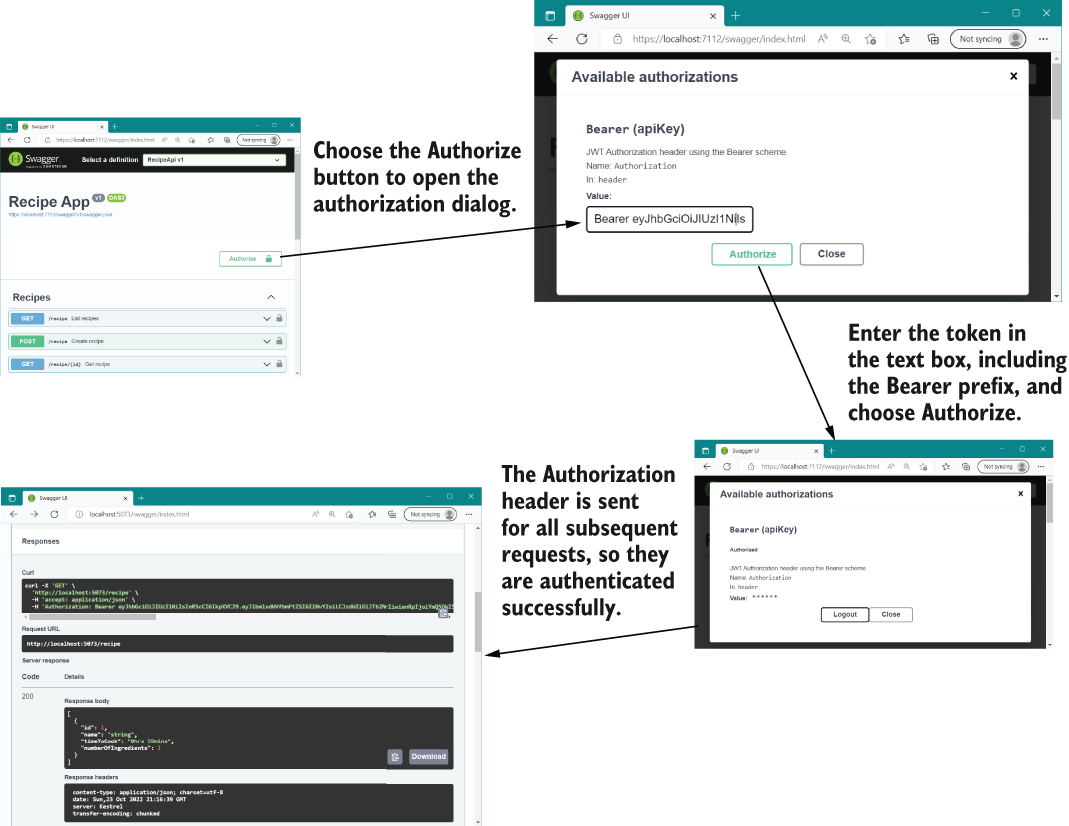
Use Swagger UI by entering Bearer <token>, including the Bearer prefix; subsequent requests receive the Authorization header. section 25.5
