Starting more work when reviews are already backed up can leave pull requests aging and merge conflicts multiplying. Kanban manages this flow as a pull system: downstream capacity signals when upstream work may enter. A board can show the work, but the pull rule determines whether the team starts more. section 6.3 section 9.4
A work-in-progress (WIP) limit makes that rule explicit. When a stage reaches its limit, the team stops pulling new work and helps finish or unblock what is already there. Standard work should also define how items enter and exit the system. section 6.3
A full review queue
If review WIP is capped at six and six items are waiting, developers can help clear reviews or slow intake rather than add another item. The limit exposes the constrained stage and makes completion a shared responsibility. section 6.3
A To Do, In Progress, Done board answers where tickets are. A diagnostic board also makes system behavior visible: for example, a consistently deep Ready for Review column signals a queue. Use the pile-up to ask where work is waiting, not just how many tickets have moved. section 9.4
Figure 9.11 A dashboard Kanban board is read as a diagnostic tool. The Ready for Review section has five items, more than any other column, revealing a queue at the review station. Items can be color-coded by age. The queue, colors, and intention are visible at a glance.
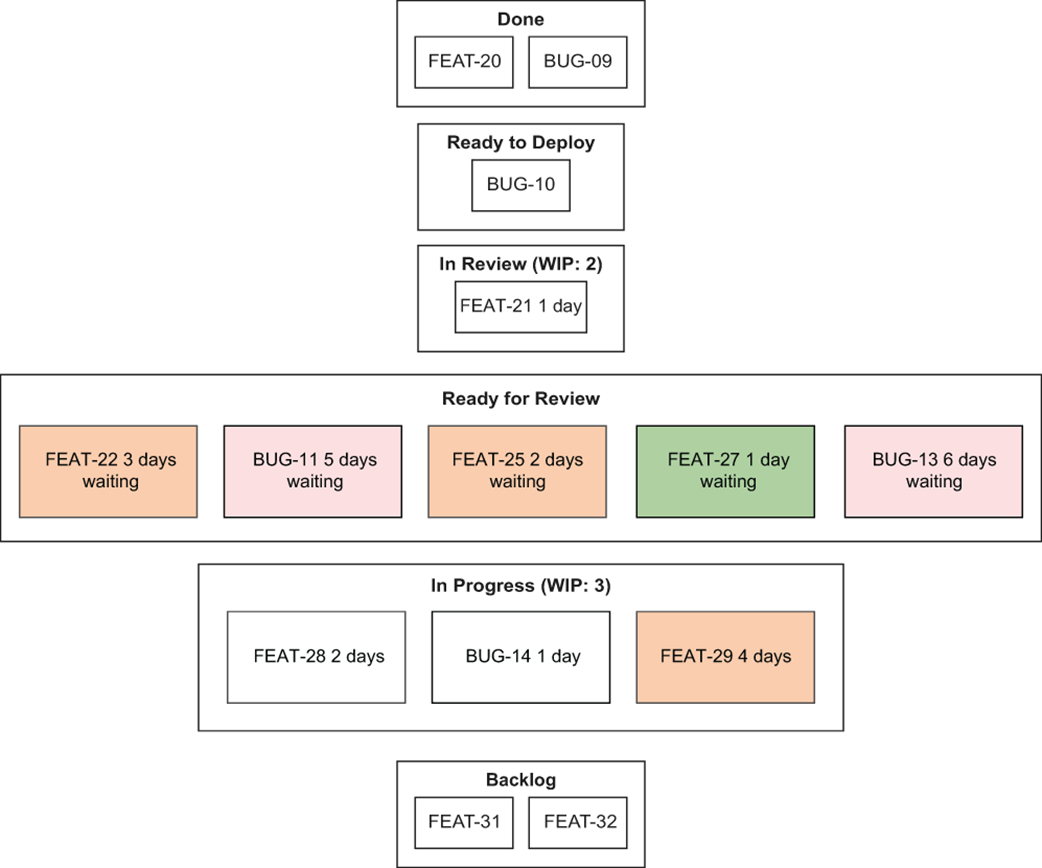
The board shows a review queue at a glance, with item age available as an additional visual signal. section 9.4
Start with the board and workflow you already have. Look for accumulating work, set limits that protect capacity, and respond to a full stage by finishing or escalating rather than starting another task. section 6.3 section 9.4