Company information gives business customers a company-level view of ACH activity. It supports storing and displaying a company’s identity and overview details so users can navigate from a company list into a dashboard with services, controls, and reporting relevant to that business. This differs from an individual account view: a company may need batch totals and related activity because the whole batch affects its operations. section 10.2 section 10.0
Treat company information as a foundation rather than an isolated screen. Design the company tables first, because later dashboard features depend on a company ID and some features need customer details already available. This sequencing reduces rework while allowing independent enhancements to begin where their only dependency is a company foreign key. section 10.1
A practical company overview can include:
- A unique company ID, company name, and industry classification. section 10.2.3
- A logo represented as a Base64 image, validated against an image-data pattern before display. section 10.2.3 section 10.2.4
- A list endpoint that returns defined companies for an overview page. section 10.2.3
- A selectable company listing with name, industry, and logo that routes the user to that company’s dashboard. section 10.2.4
Building a company overview
Start with a record for the fields the overview needs. Retrieve those fields from the companies table through a dedicated SQL class, then expose a GET endpoint returning a list of overview records. On the client, load that list, render it in a grid, validate each logo before assigning it as an image source, and make each row open the selected company dashboard. Test the API in an isolated database environment and validate returned data, not only the success status. section 10.2.3 section 10.2.4
Listing 10.11 The CompanyOverview Record
class CompanyOverviewRecord(BaseModel):
    company_id: Optional[UUID4] = Field(
        None,
        title="Company ID",
        description="Unique identifier for the company.",
    )
    name: Optional[str] = Field(
        None,
        title="Name",
        description="Name of the company.",
        max_length=255,
    )
    industry: Optional[IndustryType] = Field( #1
        None,
        title="Industry",
        description="Type of industry the company operates in.",
    )
    logo: Optional[str] = Field(
        None,
        title="Logo",
        description="Base64 Image of the Logo.", #2
        pattern=r"^data:image\/[a-zA-Z]+; #3
➥base64,[A-Za-z0-9+/=]+$"  #3
    )
The overview record shows a compact contract for company ID, name, industry, and a validated logo. section 10.2.3
Figure 10.2 Component for listing the companies
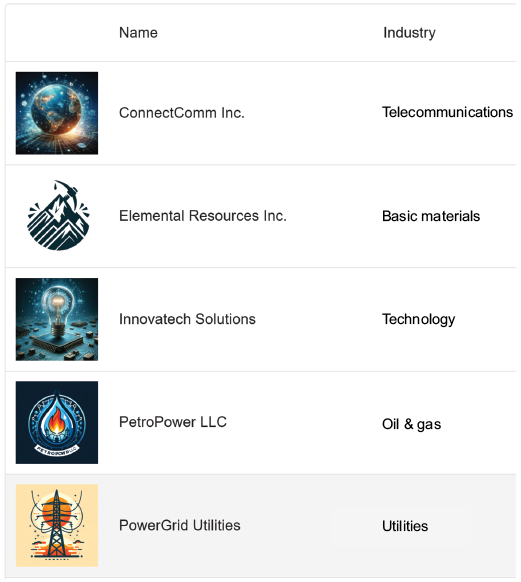
The company-listing interface illustrates the overview as a navigable entry point to company dashboards. section 10.2.4
