CI can build and publish an artifact while a GitOps agent reliably deploys whatever Git declares. Neither decides which artifact should advance to the next environment, who approves it, or how to reconstruct its path to production. Kargo is an open-source, Kubernetes-native promotion control plane for that gap. It governs advancement without replacing CI, Git, or the agent that reconciles the cluster. section 1.0 section 1.2
Kargo represents a delivery pipeline as a graph of Stages. Its Kubernetes custom resources can be managed with YAML and kubectl; controllers watch them and reconcile their state. Five resource types give each part of a promotion a distinct role: section 3.1 section 3.7
- A Project groups resources for a team or domain; a Warehouse discovers versions in artifact repositories. section 3.7
- Freight identifies an immutable artifact set by digest; a Stage marks a target in the progression graph. section 3.7
- A Promotion records one advancement event, making movement between stages explicit and traceable. section 1.5 section 3.7
Follow one image to production
Suppose CI publishes image 1.1.0. A Warehouse detects the version and creates Freight pinned to its digest. A Promotion for the dev Stage clones the GitOps repository, updates the dev overlay, commits, and pushes. Argo CD sees the Git change and reconciles the dev Application and cluster. After verification in dev, the same Freight can advance to staging and then production. The boundary matters: Kargo governs discovery and the Git write; Argo CD performs cluster reconciliation. section 3.5 section 3.7
Figure 3.3 End-to-end promotion of the demo-app image, from the container registry to a running pod in the demo-dev namespace. The six lettered steps, A through F, mark the boundary between layers. Kargo owns steps A through D; Argo CD owns steps E and F. The Warehouse and Stage are Kargo resources living in the cluster; the GitOps repository and the Argo CD Application are infrastructure Kargo writes to but does not own. The Freight object is the lineage record that ties the whole chain together.
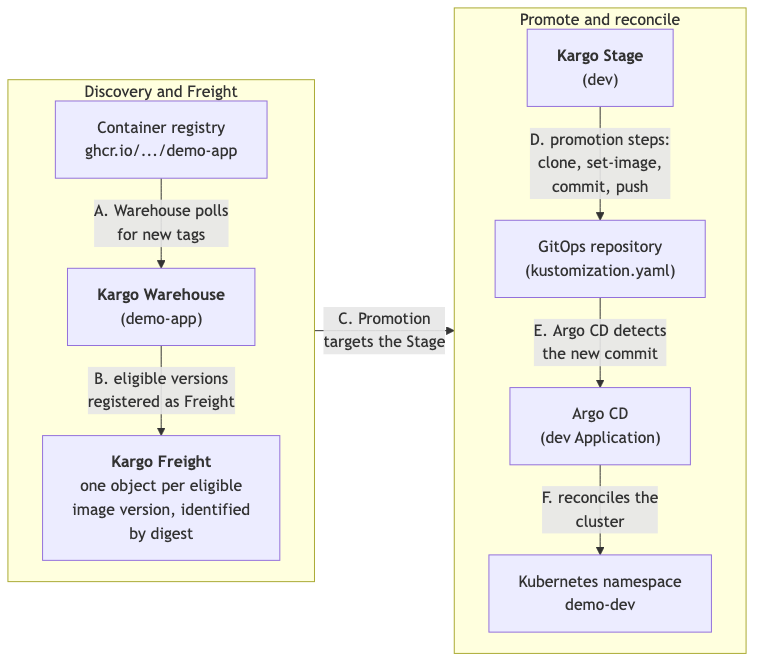
Trace the artifact from registry to running pod and locate the hand-off from Kargo’s Git write to Argo CD’s reconciliation. section 3.5
For a first installation, prepare a Kubernetes cluster with privileges to install CRDs, cluster-scoped RBAC, and controllers; install cert-manager first. Use Helm v3.13.1 or later, supply the required admin password hash and token-signing key, and verify the CRDs, deployments, controller logs, and RBAC after installation. A successful Helm command alone does not establish that promotion will work. section 3.3 section 3.4
If a first promotion stalls, describe the affected Kubernetes resource and check registry credentials, Git push permissions, Argo CD sync configuration, and stage ordering. Repeated controller-log errors such as “forbidden” or “cannot list” point toward RBAC even when pods appear healthy. Git-based steps can work with other GitOps reconcilers, but Kargo’s native argocd-update step is specific to Argo CD. section 3.7 section 3.4 section 3.5
The additional control plane has an operating cost: it must be installed, upgraded, secured, and debugged. Open-source Kargo is aimed at Kubernetes delivery, particularly where multiple environments, teams, or compliance requirements make informal promotion risky; a single-developer, single-environment setup may not warrant it. section 1.3.4