A keyspace is the top-level home for related ScyllaDB tables. It groups tables and sets how their data is replicated across a cluster; its durable-writes setting is also part of its definition. Think of it as roughly like a relational database or schema, but with cluster-wide replication configuration attached. section 2.2.1 section 2.2.2
The hierarchy is keyspace, table, partition, then row. A table’s primary key determines its partitions, and partitions are the units replicated to cluster nodes. Keyspace replication settings therefore affect every table stored inside it, while primary-key design determines how each table distributes its rows. section 2.2.1 section 2.5
Create and work with a keyspace in CQL:
- Run CREATE KEYSPACE with a meaningful name and a replication configuration before creating tables. section 2.2.2
- Use DESCRIBE to inspect the CQL definition, including replication and durable_writes. section 2.2.2
- Run USE keyspace_name to make unqualified table names refer to that keyspace. section 4.1.1
- Choose replication deliberately: SimpleStrategy is suitable for a learning playground but flagged as unsuitable for production. section 2.2.2 section 5.2
Restaurant-review keyspace
A reviews keyspace can hold the tables for a review application. Create the keyspace with its replication settings first, select it with USE reviews, and then create the application tables. For a disposable data-type playground, a separate types keyspace can use replication_factor 1. section 5.2 section 4.1.1 section 5.3
Figure 2.3 ScyllaDB consists of rows, identified by primary keys and grouped into partitions, which are grouped into tables, which are grouped into keyspaces.
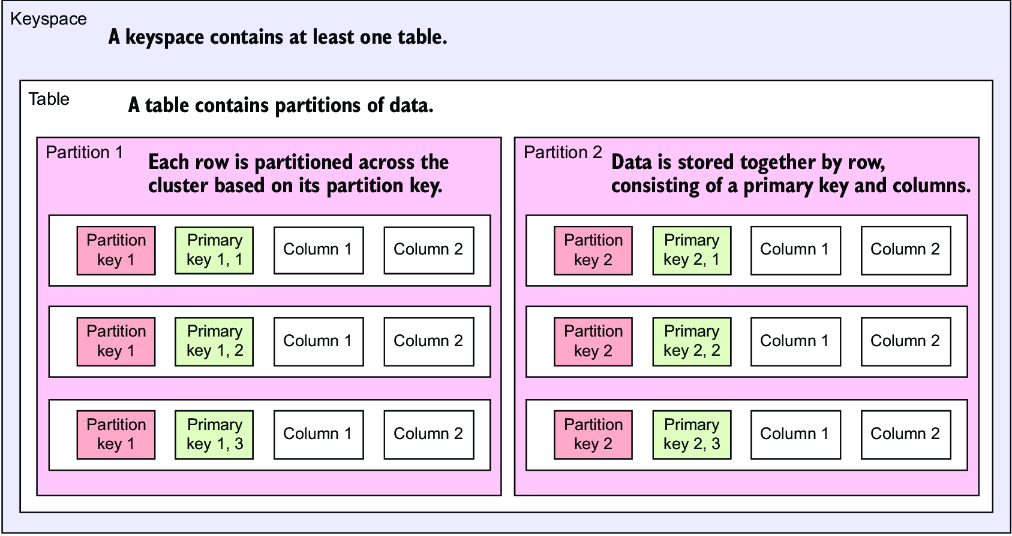
Use the hierarchy diagram to locate a keyspace above tables, partitions, and rows, and to connect replication settings with the data those tables contain. section 2.2.1

