liveBook · Manning

Incremental view

As explained in Effective Data Analysis

A representation that displays the value or change attributable to each individual time period or observation.

An incremental view displays a metric’s value for each time period rather than only its accumulated total. It reveals changes that a cumulative view can conceal, such as seasonal variation. section 7.3.2

Use an incremental view to make period-by-period performance easier to interpret:

  • Compare monthly changes in qualified sales leads instead of relying only on cumulative qualified leads. section 7.3.2
  • Use a line graph to show trends across time and compare segments such as region or industry. section 7.3.2
  • Pair the focal metric with a counter metric, such as Lead Response Time, to prevent narrow optimization. section 7.3.2
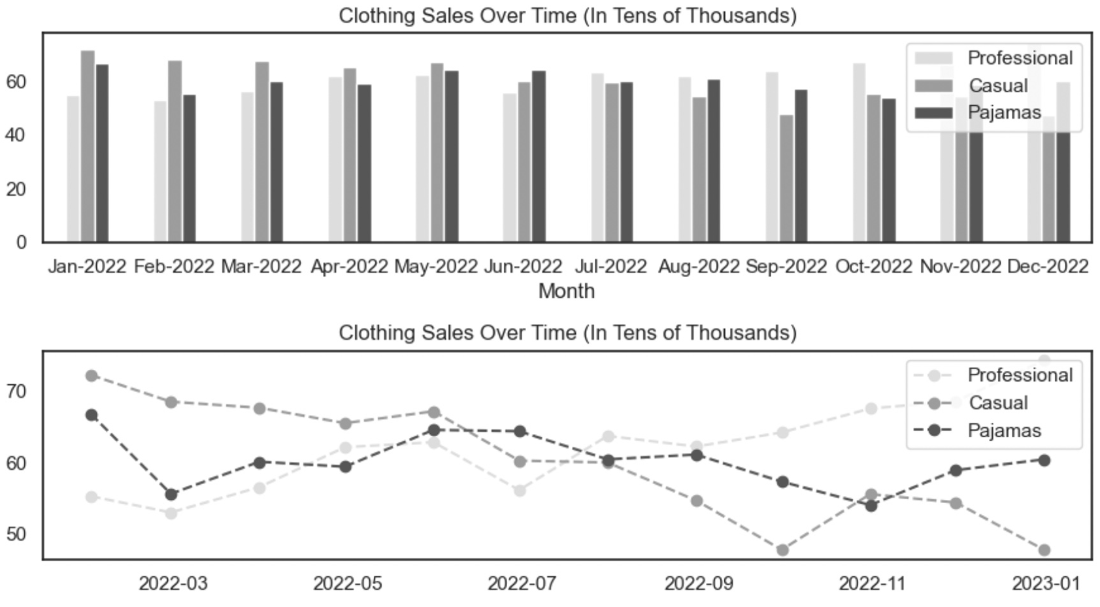
Figure 7.22 Line graphs are typically easier to interpret when visualizing trends between groups over time.
figure

A line graph supports interpretation of incremental changes and trends between groups over time. section 7.3.2

How Effective Data Analysis covers it

How deep it goes
Defines the contrast with cumulative views and explains its visualization role, without detailing computation or implementation.
Examples
Uses monthly qualified sales leads, regional or industry segments, and Lead Response Time as a counter metric.
What it assumes
Assumes a metric measured across time and an understanding of cumulative totals and stakeholder-facing visualization.
What you can do after
Evaluate month-to-month changes and communicate seasonal performance without relying solely on cumulative totals.
How it connects
Connects incremental views with cumulative views, seasonal fluctuation, line graphs, segmentation, and counter metrics.

This explainer was generated by Manning's knowledge graph from the text of Effective Data Analysis. The section links point to the parts of the book it draws on.