A knowledge store holds information that an agent can retrieve to support reasoning and answer questions. A practical store loads documents, splits them into chunks, embeds those chunks, and indexes them in a vector database. section 8.5
Build and use a knowledge store through this workflow:
- Create a store in the Knowledge Store Manager and upload a document. section 8.5
- Wait while the system loads, splits, chunks, embeds, and indexes the document in Chroma DB. section 8.5
- Inspect embeddings, run a query, and connect the store to an agent engine that supports knowledge. section 8.5
- Adjust the splitter, chunk size, and overlap settings to study their effects on retrieval. section 8.5
A movie-script knowledge store
Upload back_to_the_future.txt, wait for indexing, inspect its embeddings, and query the resulting store. Select the time_travel store for a supported agent, then ask questions about the document. The current interface supports one knowledge store at a time. section 8.5
Figure 8.12 Managing the knowledge store splitting and chunking options
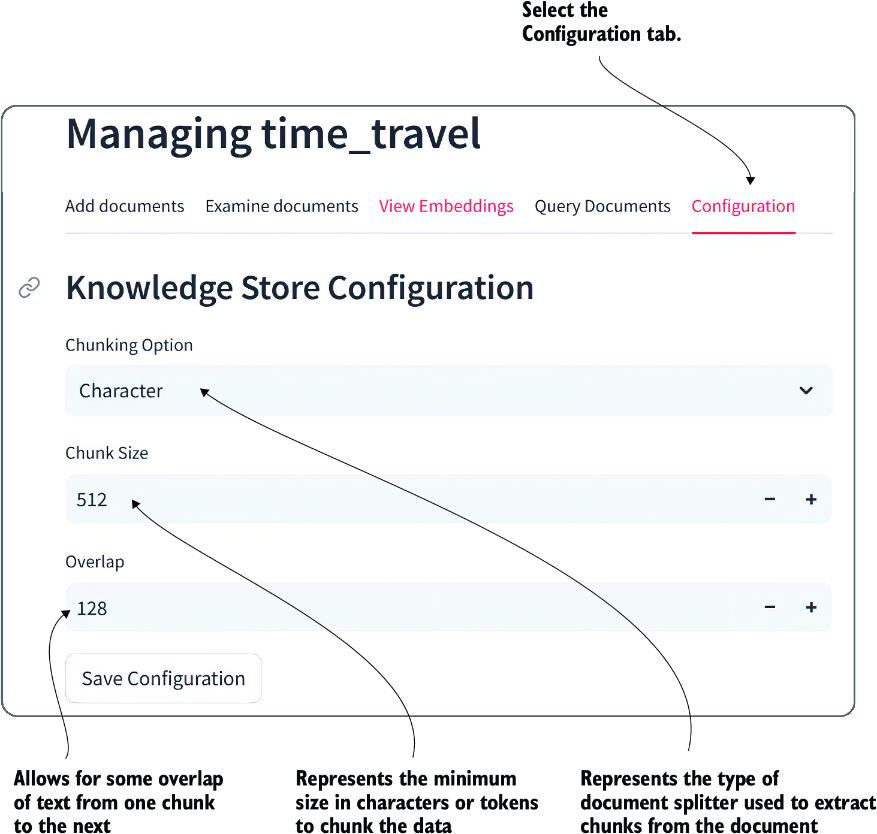
Use the configuration view to inspect and change the knowledge store’s splitting and chunking options. section 8.5
