kubectl rollout history displays the recorded revisions of a Kubernetes workload, helping you inspect earlier versions before choosing whether to roll back. section 15.2.6
Use the command to:
- List revisions for a Deployment with kubectl rollout history deploy <name>. section 15.2.6
- Inspect one revision with --revision, including its pod-template labels and container image. section 15.2.6
- List StatefulSet revisions with kubectl rollout history sts <name>. section 16.3.1
Inspect a Deployment revision
$ kubectl rollout history deploy kiada REVISION CHANGE-CAUSE 1 <none> 2 <none> 11 <none> $ kubectl rollout history deploy kiada --revision 2 Pod Template: Containers: kiada: Image: luksa/kiada:0.6 The CHANGE-CAUSE column may be empty. The --record option populated it in older workflows, but that option is deprecated. section 15.2.6
Revision history is stored through controller-managed objects rather than only in the current workload manifest. Deployments retain ReplicaSets, with each ReplicaSet representing a revision. StatefulSets use immutable ControllerRevision snapshots; DaemonSets use the same object type. section 15.2.6 section 16.3.1
Figure 15.10 A Deployment’s revision history
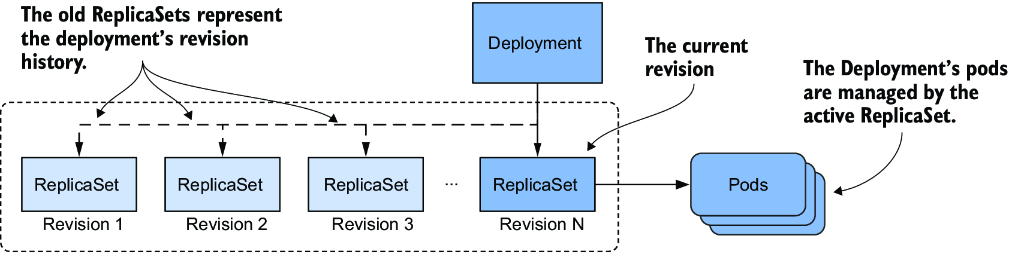
Use the revision-history diagram to connect workload revisions with the controller-managed objects that preserve them. section 15.2.6
