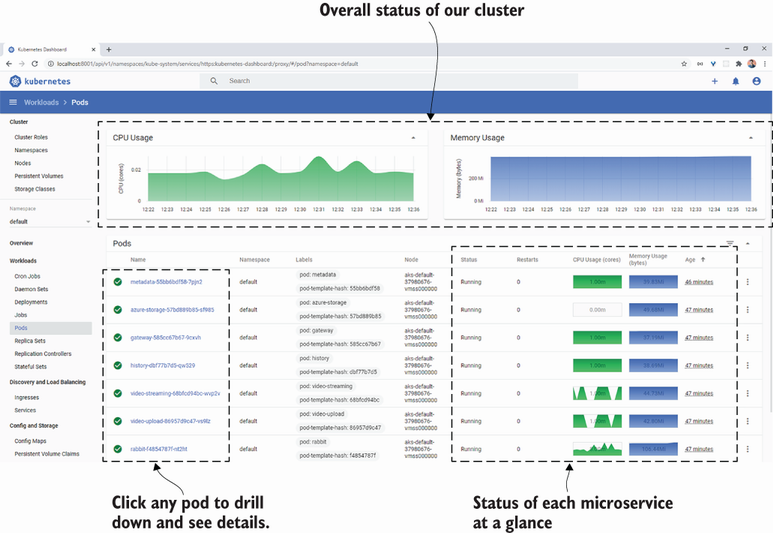
The Kubernetes dashboard is a web-based user interface for viewing and managing Kubernetes cluster resources and workloads.
Kubernetes Dashboard provides a visual way to inspect and explore cluster resources, especially pods and their operational state. section 11.2.4
Use it to:
Drill down into individual pods and view logs, CPU usage, and memory usage. section 11.2.4
Explore workloads and other Kubernetes resources through a graphical interface. section 11.2.4
Make cluster modifications when necessary, while avoiding manual production changes. section 11.2.4
Inspecting a microservice pod
Open the dashboard, view all pods, select the pod containing the metadata microservice, and inspect its details and logs alongside CPU and memory information. section 11.2.4
Figure 11.5 The Kubernetes dashboard showing all the pods in our cluster
Browse the dashboard view showing all pods, then follow the related pod-detail and microservice-log views. section 11.2.4
How Bootstrapping Microservices, Second Edition: With Docker, Kubernetes, GitHub Actions, and Terraform covers it
How deep it goes
Demonstrates pod exploration and operational metrics but defers installation and access to official instructions.
Examples
Uses the metadata microservice to demonstrate pod details, logs, CPU usage, and memory usage.
What it assumes
Assumes access to a Kubernetes installation and requires dashboard installation where it is not included.
What you can do after
Operate the dashboard to inspect pod state, review logs, monitor resource usage, and cautiously modify cluster resources.
How it connects
Connects Kubernetes clusters with pods, microservices, logs, CPU usage, and memory usage.
Kubernetes clusteruses · A Kubernetes cluster is a set of control-plane and worker machines managed by Kubernetes to run and coordinate workloads and services.
computer clusteruses · A computer cluster is a group of interconnected computing nodes coordinated to provide shared computing resources, execute workloads, or deliver services.
kubectlalternative to · kubectl is the Kubernetes command-line client for communicating with the Kubernetes API and managing cluster resources.
Kubernetesuses · Kubernetes is an open-source platform for orchestrating and automating the deployment, scaling, and management of containerized workloads across computing clusters.
kubeconfiguses · A kubeconfig is a configuration file containing Kubernetes cluster connections, credentials, users, and contexts that client tools use to access and select clusters.
loguses · A log is a record of events, activity, or diagnostic information produced during the operation of a system or process, often ordered by time.
This explainer was generated by Manning's knowledge graph from the text of Bootstrapping Microservices, Second Edition: With Docker, Kubernetes, GitHub Actions, and Terraform. The section links point to the parts of the book it draws on.