Need more than one pod for a stateless application? A Deployment manages replicated pods through a ReplicaSet. The ReplicaSet maintains the requested number of pods, while the Deployment provides a place to change the workload and roll out a new version. This makes replacement and scaling practical when pods are ephemeral. section 5.1 section 5.1.2
A Deployment is a Kubernetes API object, not a pod. Its YAML places the pod definition under `spec.template`, inside the Deployment's own `spec`. To compare the two shapes, generate files with `kubectl run nginx --image nginx --dry-run=client -o yaml > pod.yaml` and `kubectl create deploy nginx --image nginx --dry-run=client -o yaml > deploy.yaml`. section 1.4 section 5.1.2
Create, scale, and update a workload
Run `kubectl create deploy apache --image httpd:2.4.65 --replicas 3`, then check `kubectl get deploy` for three ready replicas. Run `kubectl scale deploy apache --replicas 5` and check `kubectl get po` for five pods. Change the image with `kubectl set image deploy apache httpd=httpd:alpine`; use `kubectl get deploy`, `kubectl get rs`, and `kubectl get po` to inspect the resulting Deployment, ReplicaSets, and pods. An image change creates a new ReplicaSet for the new pods. section 5.1.1 section 5.1.2
Figure 5.5 When the Deployment image is changed, a new ReplicaSet is created with a new set of pod replicas.
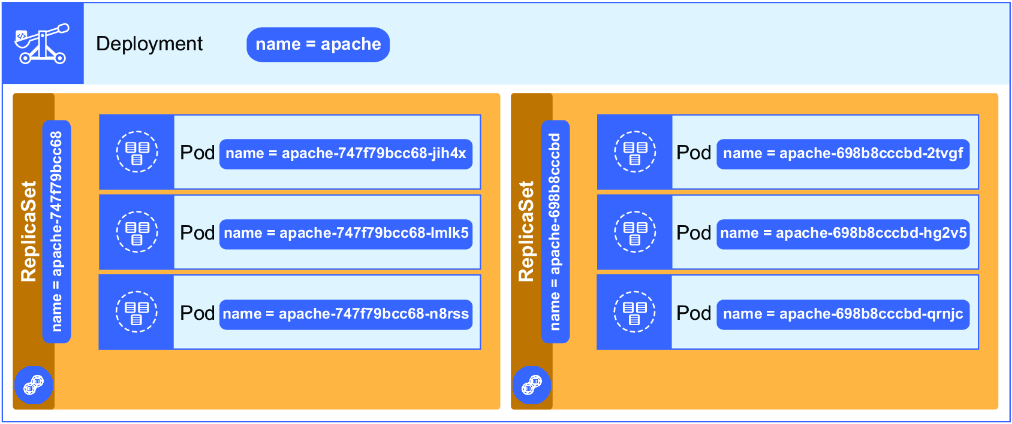
Use the figure to trace the operational consequence of an image change: a new ReplicaSet and a new set of pod replicas. section 5.1.2
A Deployment's rolling-update strategy controls how many replicas may be added or unavailable during an update. If the application needs a stable endpoint, expose the Deployment with a Service; do not confuse healthy Deployment replicas with working Service access. When access fails, compare the Service's port and selector with the application's port and pod labels. section 5.1.2 section 8.3.2
For practice, scale the CoreDNS Deployment in `kube-system` and verify the pod count with `kubectl -n kube-system get po`. Scaling it to zero terminates its pods and leaves cluster hostname resolution unavailable. If a newly created Deployment instead produces an unhealthy pod, inspect that pod's logs: a MySQL example reports a missing required password setting, then runs after the Deployment is corrected. section 6.2.3 section 8.1









