A Kubernetes Secret is an API object for sensitive data such as credentials, passwords, or certificate data. Values are base64-encoded, but stored unencrypted by default; anyone with cluster access may be able to read them, so a Secret should not be the only security control. section 4.2.5
Use a Secret as part of an observable administrator workflow:
- Generate a manifest with kubectl: kubectl create secret generic dev-login --from-literal=username=dev --from-literal=password='S!B*d$zDsb=' --dry-run=client -o yaml > dev-login.yaml. section 4.2.5
- Inspect the manifest to see base64-encoded values, then create or update the object with kubectl apply -f dev-login.yaml. section 4.2.5
- Expose the Secret to a pod either by mounting it as a volume or by supplying its values through environment variables. section 4.2.5 section 4.3
- Verify a volume mount with kubectl exec secret-pod -- cat /etc/secret-vol/username and the corresponding password command. section 4.2.5
Expose Secret data through a volume
Create a Secret named dev-login, add a Secret volume and volume mount to a busybox pod, then inspect /etc/secret-vol/username and /etc/secret-vol/password from inside the running container. The same data can be passed through environment variables when the pod command prints its environment. section 4.2.5
Figure 4.20 Mount the secret data for the pod to access, ensuring the data can be reached from /etc/secret-vol inside the container.
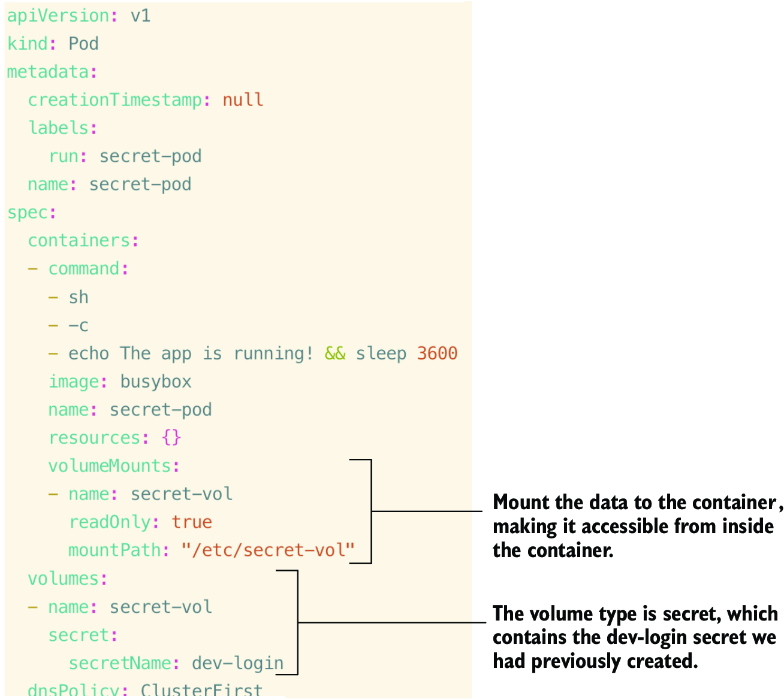
Use the manifest illustration to connect the Secret volume declaration with the container path that exposes the data. section 4.2.5





