A Kubernetes label selector lets a Service find Pods by labels and route traffic to matching endpoints. In a production-style deployment, a Service can expose payment or order Pods while keeping client access separate from Pod placement. section 8.2.6
Use selectors to control which Pods receive Service traffic:
- Match a Service selector such as app: payment to Pods carrying the corresponding label. section 8.2.6
- Route requests through a LoadBalancer or NodePort while Kubernetes forwards them to a matching Pod. section 8.2.6
- Share one selector across stable and canary Deployments so requests can reach both versions during gradual rollout. section 8.4.3
Payment Service selector
A Service named payment selects Pods labeled app: payment, exposes port 80, forwards TCP traffic to targetPort 8081, and uses a LoadBalancer for public access. section 8.2.6
apiVersion: v1
kind: Service
metadata:
  name: payment
  labels:
    app: payment
spec:
  selector:
    app: payment          #1
  ports:
    - name: grpc          #2
      port: 80            #3
      protocol: TCP       #4
      targetPort: 8081    #5
  type: LoadBalancer      #6
Inspect the complete Service manifest showing metadata, selector, gRPC port naming, TCP protocol, target port, and LoadBalancer exposure. section 8.2.6
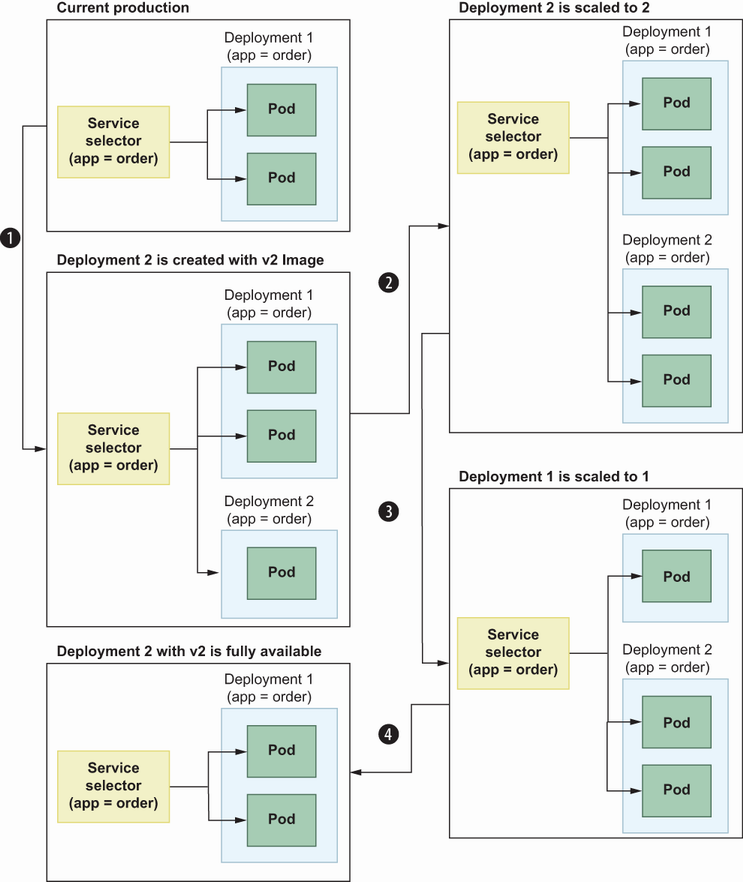
Trace how a shared selector enables requests to move progressively from v1 Pods to v2 Pods during a canary deployment. section 8.4.3






