A latency distribution describes the range and frequency of delays observed across comparable operations. A single average hides variability: latency can change with workload, queuing, and system state. Minimum and maximum values show only the extremes, not how often slower operations occur. section 2.2
Percentiles make the slow end visible. The 99th-percentile latency is a value within which 99% of measured requests fall; high percentiles such as the 95th, 99th, and 99.9th describe tail latency. Do not automatically discard slow observations as benchmark noise: users can encounter them, and a parallel service must wait for its slowest subtask. section 2.2
Figure 2.5 Tail latency illustrated. The diagram shows the probability of service latency being more than 1 second (y axis) as a function of parallel fanout count (x axis) depending on the probability of one fanout request being slow.
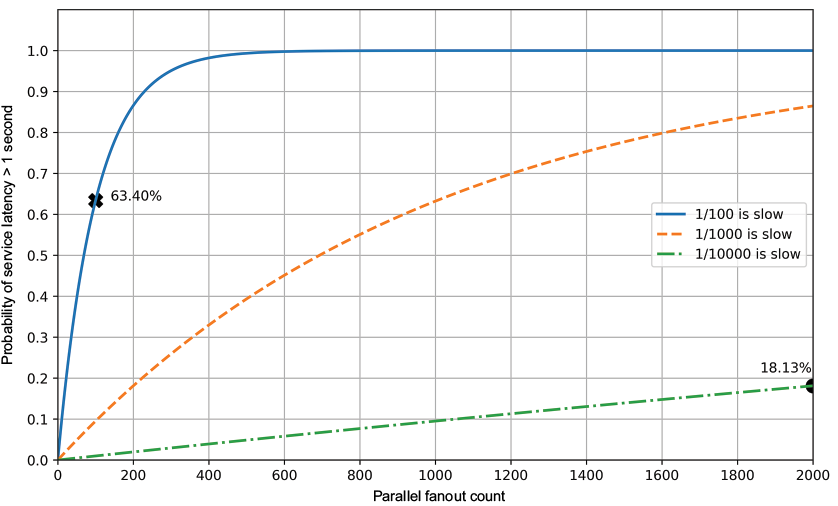
The figure relates parallel fanout to the probability that service latency exceeds one second, showing why even infrequent slow subrequests matter. section 2.2
Measure the distribution without making slow periods disappear:
- Define the operation and measure each request from its start timestamp to its response timestamp. section 2.5
- Send requests at fixed intervals and handle responses asynchronously. Waiting for each response before sending the next causes coordinated omission: a pause reduces the number of requests sent and hides affected observations. section 2.5
- Keep measurement infrastructure separate from the system under test, and control configuration and load when comparing results. section 2.5
Network round-trip latency
Use Python 3 and ping3 to send ICMP echo requests at one-second intervals, collect round-trip times, and write the samples to CSV after measurement so disk writes do not disturb it. A 100-second run provides samples to inspect. The example times out requests taking longer than one second, so those outliers are absent from its resulting distribution. section 2.6
Listing 2.1 Measuring network latency with the ping3 Python library
#!/usr/bin/env python3

from ping3 import ping
import pandas as pd
import argparse
import time

parser = argparse.ArgumentParser()
parser.add_argument('host')
parser.add_argument('samples')
args = parser.parse_args()

interval = 1
values = []
for i in range(0, int(args.samples)):
    value = ping(args.host, timeout=interval)
    if not value:
        print("warning: ping timed out, latency outlier not measured")
        continue
    values.append(value)
    time.sleep(interval - value)

df = pd.DataFrame({"Latency_secs": values})
output = "ping-%s.csv" % (args.host)
df.to_csv(output, index=False)
The complete measurement program records ping results and writes them to a CSV file; its timeout handling also shows which observations it loses. section 2.6
Plot the samples as a histogram to see frequency against latency and spot the sparse right-hand tail. For a complementary view, plot latency at successive percentiles with HdrHistogram. Interpret either plot alongside the sampling method: a clean-looking tail cannot reveal delays the measurement failed to record. section 2.6.1 section 2.5
