A latent diffusion model (LDM) adds and removes noise in a compact image representation rather than directly in pixel space. This makes high-resolution text-to-image generation less computationally demanding. For example, compressing a 3 × 512 × 512 image to a 4 × 64 × 64 latent representation gives the diffusion model 48 times less data to process. A variational autoencoder (VAE) decoder turns the finished latent representation into the final image. section 9.0 section 1.3.2
The components divide the work into stages:
- Train a VAE to encode images into compact latent representations and reconstruct them. Its encoder establishes the space where diffusion will run; its decoder produces pixel-space output. section 9.1.2
- Train a denoising U-Net on noisy latents from image–caption pairs. Noise is added in a forward process, and the U-Net learns to predict that noise at each time step for the reverse process, conditional on text. section 9.1.2
- Use CLIP text and image embeddings to help align generated images with their descriptions. section 9.1.2
- For generation, encode the prompt, start from random latent noise, repeatedly denoise with the trained U-Net, then decode the result with the VAE. section 9.1.2
Figure 9.3 How a trained LDM generates an image based on a text prompt. The text prompt shown at the top-left corner is first encoded into a text embedding. To generate an image in the lower-dimensional space (latent space), we start with an image of pure noise (bottom left). We use the trained U-Net to iteratively denoise the image, conditional on the text embedding so the generated image matches the text prompt, with the guidance of a trained CLIP model. The generated latent image (bottom right) is presented to a trained VAE to convert it to a high-resolution image, which is the final output (top right).
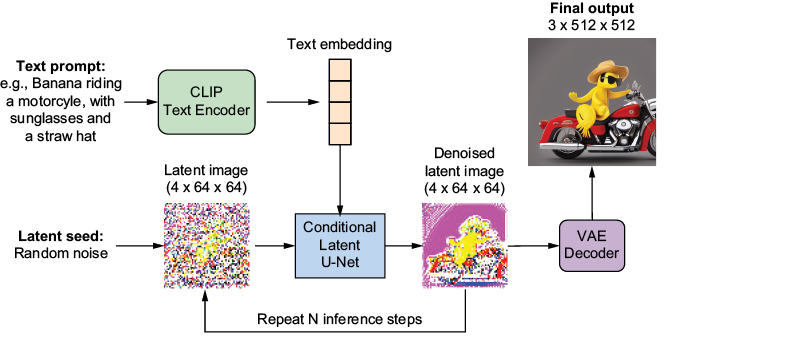
Follow the prompt embedding and noisy latent through iterative denoising to the VAE-decoded image. section 9.1.2
Generate or change a scene
A prompt such as “a banana riding a motorcycle, wearing sunglasses and a straw hat” can guide generation from random latent noise. Editing takes a different starting point: encode an existing horse image with the VAE, add controlled noise, then denoise toward a prompt such as “a white horse walks on the sunny sandy beach.” The strength parameter controls deviation from the original: less noise preserves more; more permits a larger change. section 9.1.2 section 9.4
Listing 9.8 Modifying an existing image with the LDM
import pipeline
import model_loader

models=model_loader.preload_models_from_standard_weights(model_file,
    device)
prompt="A white horse walks on the sunny sandy beach."    #1
uncond_prompt=""
input_image = Image.open("files/horse.png")    #2

output_image = pipeline.generate(    #3
    prompt=prompt,
    uncond_prompt=uncond_prompt,
    input_image=input_image,
    strength=0.8,    #4
    do_cfg=True,
    cfg_scale=8,
    sampler_name="ddpm",
    n_inference_steps=50,
    seed=42,
    models=models,
    device=device,
    idle_device="cpu",
    tokenizer=tokenizer,)
The pretrained-model call shows the editing inputs together: source image, prompt, strength, guidance scale, sampler, step count, and seed. section 9.4
Two controls serve different purposes. Editing strength determines how far an output may move from its input image. Classifier-free guidance, set with cfg_scale, trades output diversity for closer alignment with the prompt: lower values allow more diversity, while higher values favor fidelity. Working in latent space reduces memory and computation but can sacrifice image quality, making the VAE decoder essential. Training a complete LDM is computationally costly, so practical generation and editing examples use a pretrained model. Stable Diffusion is an LDM-based generator. section 9.4 section 9.5 section 9.1.2
