The API Capabilities Canvas organizes users, use cases, steps, inputs, outcomes, failures, and operations before choosing programming representations or data models. It keeps API design focused on user needs, simplifies discussion, and helps prevent incomplete, overly specific, or implementation-driven interfaces. section 2.0 section 2.2.1
Build the canvas through an iterative two-pass workflow:
- Identify users and describe their use cases. section 2.2.1
- Decompose each use case into small steps, recording inputs and successful outcomes or outputs. section 2.2.1
- Map nominal or happy paths first, then analyze alternative paths, failures, error outcomes, and recovery needs. section 2.2.1
- Refine steps into unique, context-agnostic operations; allow different steps to share an operation. section 2.2.1 section 2.5
- Check that every element serves the defined needs without exposing inner workings or encoding one consumer’s overly specific requirements. section 2.6 section 2.2.1
A collaborative digital canvas
Use a spreadsheet during an API design workshop. Add or move canvas elements, search and filter rows, then create a pivot table organized around operations to reveal where each operation is used. For complex use cases with branches or loops, supplement the spreadsheet with a PlantUML or MermaidJS flow diagram. section 2.2.2 section 2.2.2
Figure 2.3 We walk through all use cases' nominal, alternative, and failure paths. Then we refine steps to identify unique operations. Finally, we ensure that capabilities fulfill expected users' needs without being too consumer-specific or exposing inner workings.
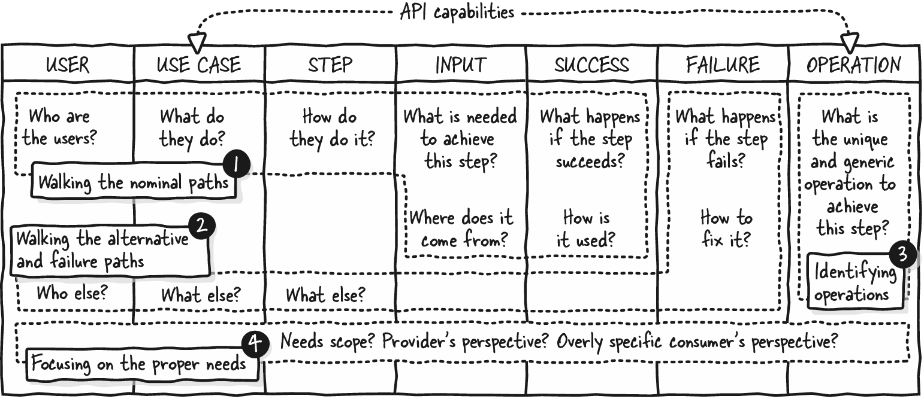
Use the workflow overview to see how paths become operations and how the final capability set remains user-focused without exposing implementation details. section 2.2.1
